I Tested Every Bot Platform So You Did Not Have To. Here Is What I Found.
I took a deep look at Dots, Muse, ChatGPT Work, Claude, Gemini, Copilot, Manus, Perplexity, OpenClaw and Grok Bot: what each one really is, where it runs, what it can share, where its holes are, and how to pick the one that fits your life. For about ten years I was a Top Writer on Quora. I answered thousands of questions, and the most useful thing I learned there was simple: when people are confused, it is almost never because they are not smart enough. It is because nobody explained the thing in plain words.
This article is sponsored by Read Multiplex Members who subscribe here to support my work: Link: https://readmultiplex.com/join-us-become-a-member/
It is also sponsored by many who have donated a “Cup of Coffee”. If you like this, help support my work: Link: https://ko-fi.com/brianroemmele
Listen to the companion podcast: https://rss.com/podcasts/readmultiplex-com-podcast/3302310
This fall the question I hear most is not about any single AI. It is this: “Brian, there are a dozen of these bot things now. What is the difference between them, and which one should I use?”
Fair question. In the span of a few weeks, OpenAI announced dots, Meta launched Muse, Anthropic folded Cowork into Claude and added a new Ultra plan, Google announced a Gemini agent for work and began turning Gems into skills, Microsoft put Cowork and Autopilot into Copilot, Manus came back as an independent company, and OpenClaw kept growing as the open source agent you run yourself. Meanwhile I have been running a good part of my working life on Grok Bot since it shipped.
So here is my attempt to do what I did on Quora for a decade. I will explain each platform in plain English, give each one its real wins, show you its holes, and then tell you plainly why I prefer Grok Bot. I am biased, and I will say so up front. But a bias is only worth listening to if it is earned, so I did the homework. Every price and feature below comes from the company’s own pages or from reporting I could check, and the sources are listed at the end. Where I could not verify something, I say so.
Why This Is So Confusing
Three reasons.
First, everyone uses the same words for different things. “Agent,” “assistant,” “bot,” “copilot,” “dot,” “muse,” “claw.” Some of these are a standing worker that lives on a computer and keeps going while you sleep. Some are a chat window with a few extra buttons. Some are a browser. Some are a coding tool. The labels tell you almost nothing.
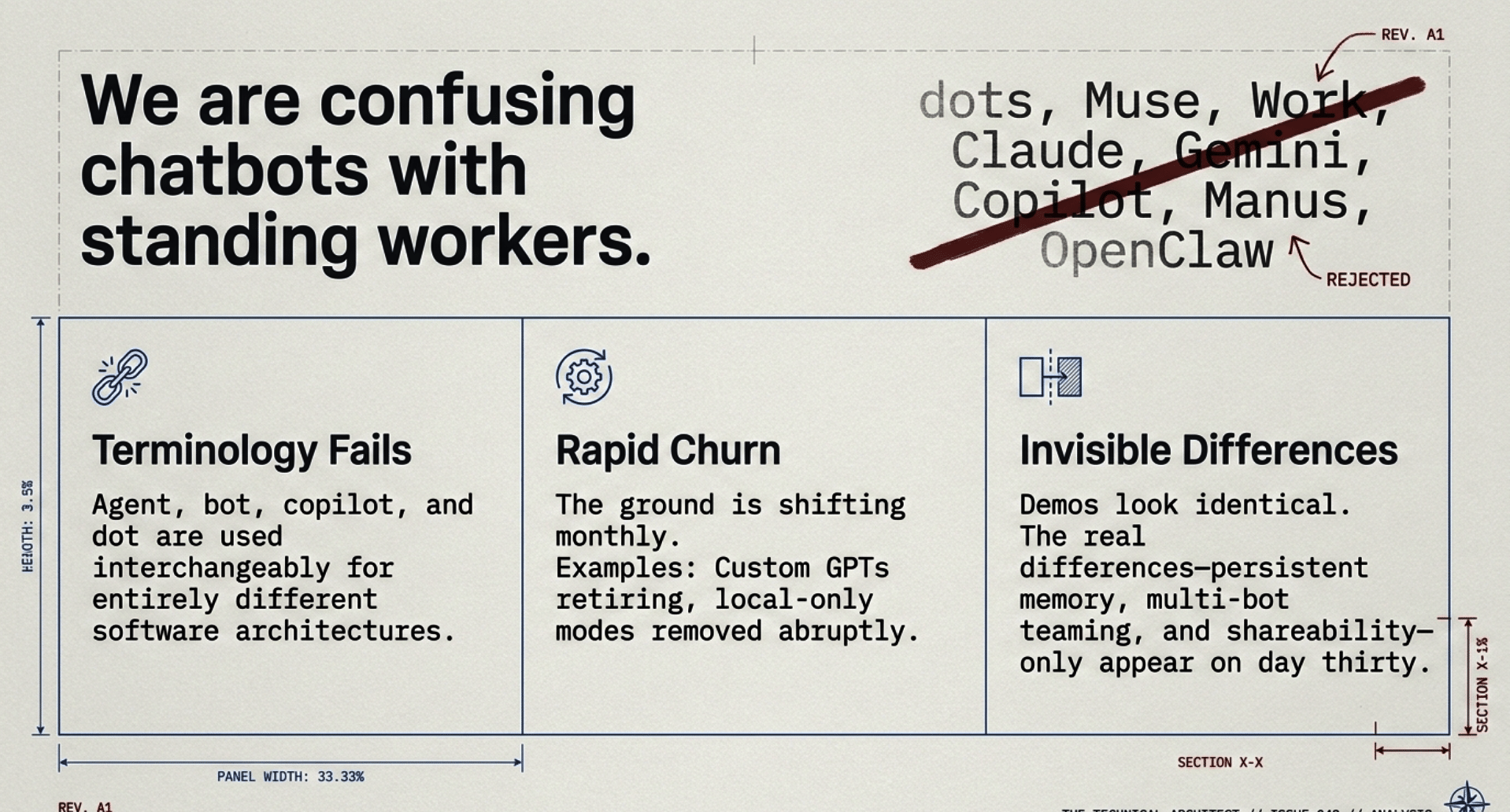
Second, the products are changing under our feet. In this month alone, OpenAI announced that custom GPTs retire on December 11, 2026. Google set November 17 for Gems to start becoming skills. Anthropic removed the option to run Cowork only on your own computer on October 6 and renamed its top plan to Ultra on October 30. If you read a review from the summer, a lot of it is already out of date.
Third, the important differences are invisible in a demo. In a two-minute video every agent looks the same: it reads an email, it books something, it writes a summary. The differences that matter show up on day thirty. Does it remember? Does it run on a schedule when your laptop is closed? Can you have more than one? Can they work together? Can you hand a working bot to a friend? What stops it from doing something you did not want?
That last question about handing a bot to a friend turns out to be the sleeper issue of this whole era, and I will come back to it in every section.
A Plain-English Primer: What Is A Bot Platform?
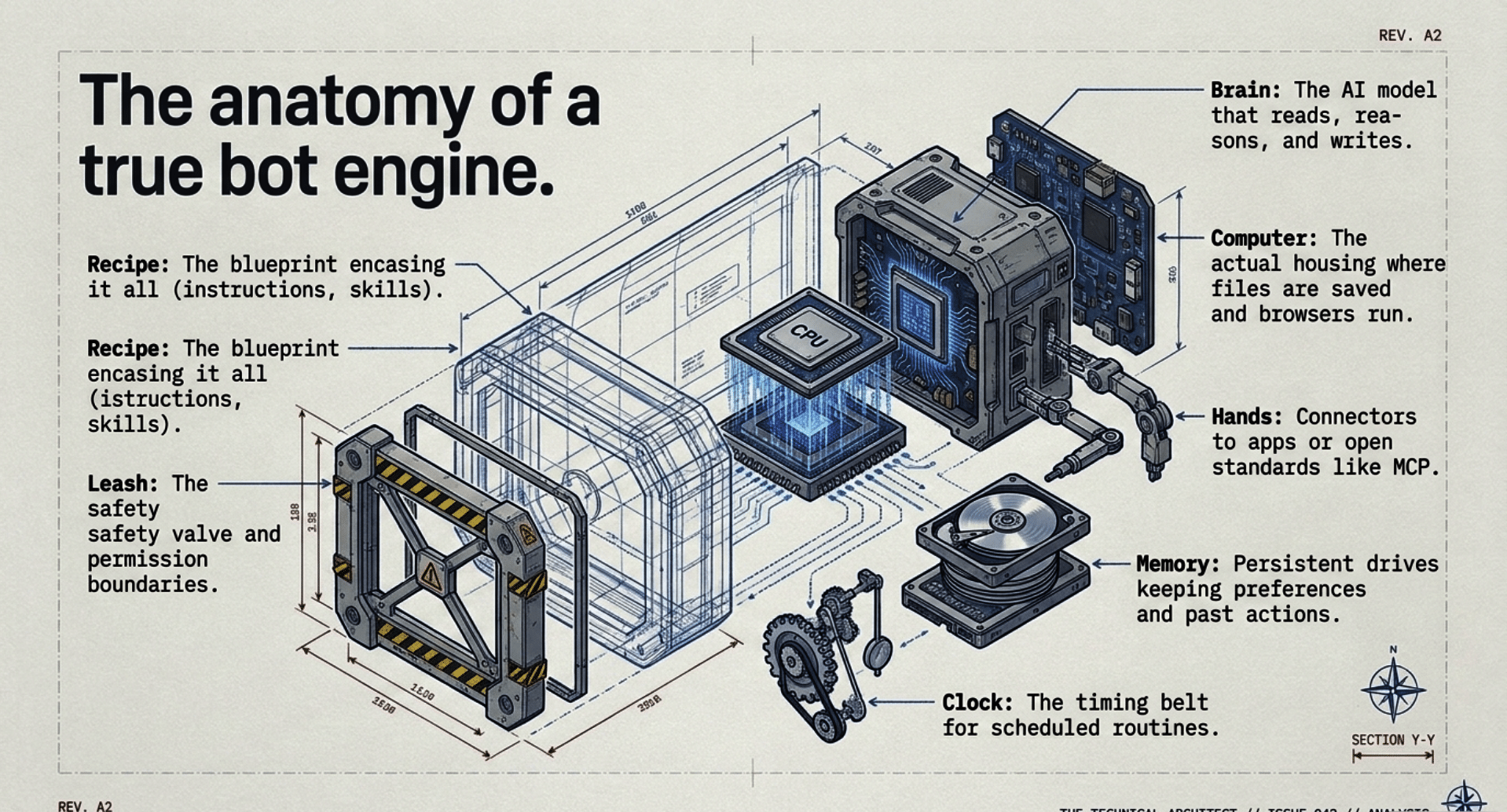
Forget the product names for a minute. Every personal AI bot platform is some mix of seven parts. Once you know the seven parts, you can read any product page and know what you are looking at.
- The brain. The AI model that reads, reasons and writes.
- The computer. Where the bot actually does its work. A real bot needs a place to open a browser, save files and run tools. That computer can live in the company’s cloud or on your own machine.
- The hands. Connectors to your apps: email, calendar, drive, Slack, GitHub and so on. Many platforms now use MCP, an open standard for plugging tools into AI. When there is no connector, a good bot can use the browser like a person would.
- The memory. What the bot keeps between conversations: your preferences, its role, what it already did.
- The clock. Schedules and triggers, so work happens at 6 AM every day, or when an email arrives, without you typing anything.
- The leash. The safety model. What it may do on its own, what it must ask about, and what it may never do.
- The recipe. Whether the setup (instructions, skills, schedules, tool choices) can be saved, copied, shared, published and improved by other people.
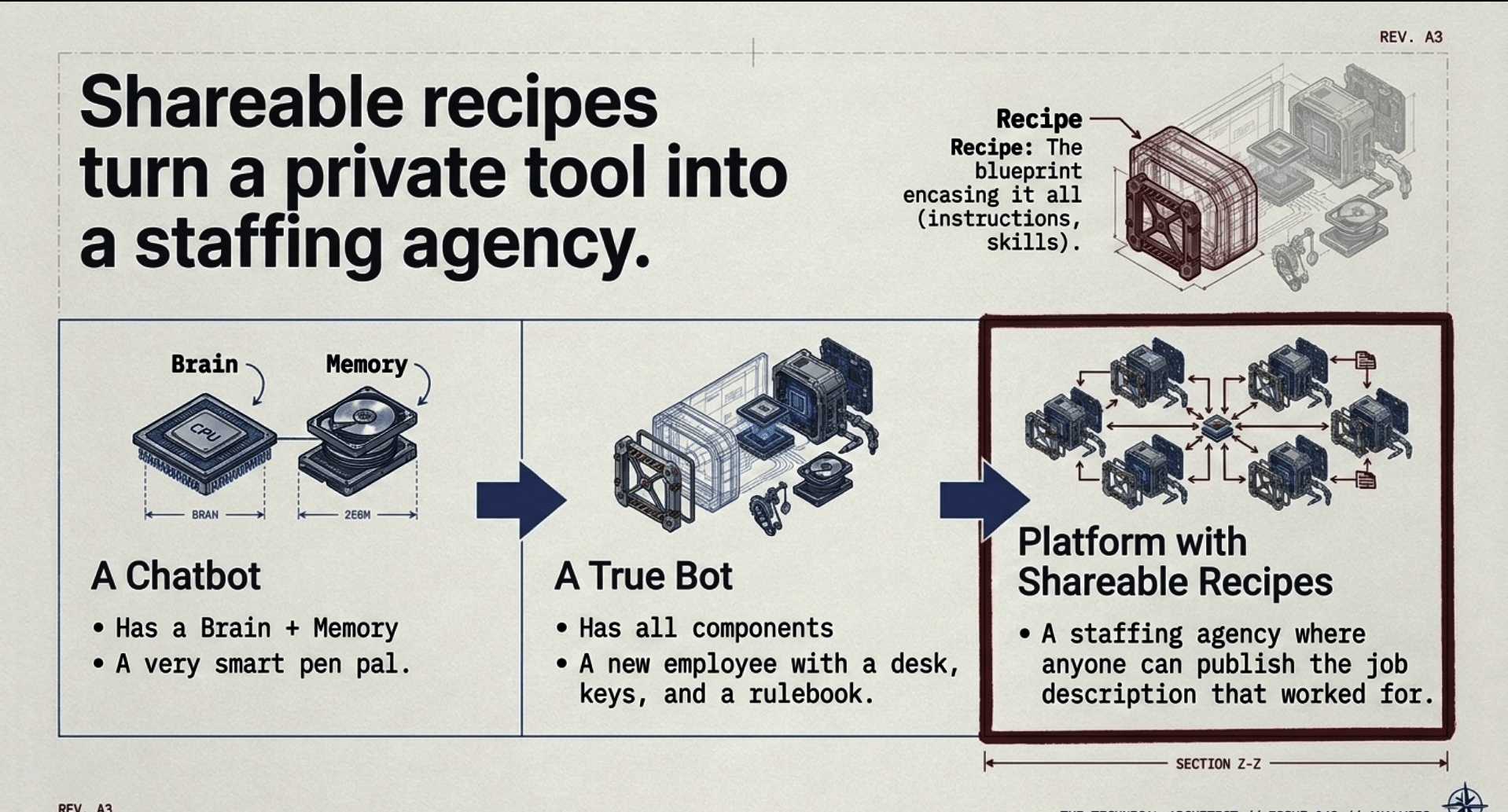
A chatbot has the brain and maybe some memory. A true bot platform has all seven. And the seventh, the recipe, decides whether a platform stays a private tool or grows into an ecosystem.
Here is a way to hold it in your head. A chatbot is a very smart pen pal. A bot is a new employee with a desk, a computer, a calendar, a set of keys you chose to give it, and a rule book. And a platform with shareable recipes is a staffing agency where anyone can publish the job description that worked for them.
Now let us walk the floor.
Grok Bot (xAI)
In one sentence: Grok Bot gives you named AI teammates, each with a job, that work on a persistent cloud computer with a browser, files and a terminal, and keep going while your laptop is closed.
Who it is for: Anyone who wants more than one standing worker, from a person running a household to a founder running a company, and teams that want to share bots the way they share documents.
Where it runs: In the cloud, on a persistent computer that belongs to your account. All of your Bots share that one computer, its files, browser sessions and app logins, which makes handoffs easy. With your permission, a Bot can also run commands on your own Mac or Windows desktop. The setting is called Execution on this computer, and the default is Ask every time. The apps run on macOS, Windows, Linux, iPhone and Android.
Memory: Each Bot keeps stable preferences, its role, key facts about you and a dated log of its work. A few facts, like your name and time zone, are shared by all your Bots. The official docs say something I wish every vendor said: for decisions that matter, have the Bot check the current source instead of trusting memory.
Scheduling and autonomy: Routines run on a schedule or on an event: an email to the Bot’s own address, a Slack message, a GitHub, Linear, Sentry or PagerDuty event, or a webhook call. They run in the cloud while you sleep. Where it is available, you can also teach a task by demonstration, showing a browser workflow once while the Bot watches.
Tools and integrations: Connected apps such as Gmail, Google Drive, calendar, Slack, GitHub and X, plus any MCP server a Bot adds by URL or command. App logins stay on the connector backend, so the Bot calls tools without holding your tokens. A Vault keeps passwords, cards and addresses out of the chat. Your Bots can claim their own email address at mail.grokbot.com to receive, read and send email. There is voice typing, voice memos and live voice chat. Bots build Pages, readable reports and dashboards with tables, charts and controls, that live in a Library and can be updated by a routine. And you can tag @bot in a post on X to hand your main Bot a task, where that is available.
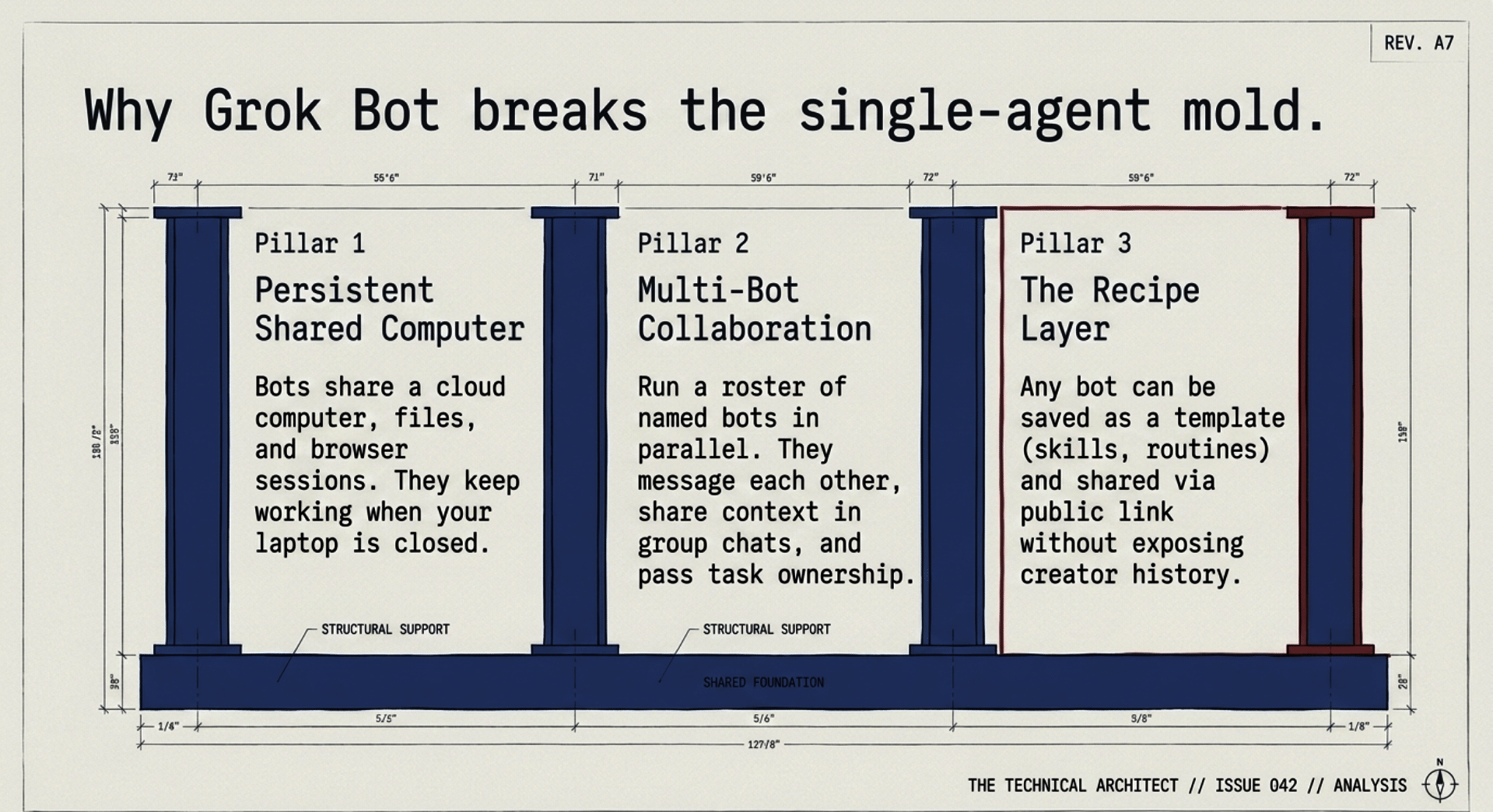
Multi-bot and teams: This is where Grok Bot pulls away. You can run many Bots in parallel. They can message each other, share context in group chats of two to six Bots, and pass ownership of a task. On a team, you can share a Bot with colleagues like a document, and each person’s chat with it stays private.
Sharing and marketplace: Any Bot can become a template. You choose Share, Create a copy, Publish and Copy link, and anyone with the link can add their own copy. The template carries the Bot’s identity, description, skills and routines. The person who adds it never gets your computer, your logins or your history. You can push updates to the template later or turn the link off. There is an official Grok Bot Marketplace at x.ai/bot/marketplace, sorted into categories, and a large community of builders sharing template links on X every day. More on that ecosystem below, because it is the heart of why I prefer this platform.
Safety model: A check called Auto Review looks at each action before it runs. Text that arrives from an email or a web page does not count as your instruction, which is the right design for resisting prompt injection. When an action needs you, you get an approval card. You can add your own rules, such as “Ask first before sending any external email.” Team admins can require Auto Review and cap local computer access.
Price, as publicly stated: On The X Subscription, Grok Bot is included with Premium at $30 a month, Super at $100 and Ultra at $200. Plus at $8 does not include it. Usage comes from one weekly pool shared with the Grok apps and Cursor, and it resets weekly. Team seats are priced per seat at the same tiers.
Real strengths: Many named bots instead of one. A shared computer that makes handoffs natural. Real scheduling and event triggers. Teamwork between bots. Its own email. Pages. Local access when you allow it. And the recipe layer, shareable templates and an official marketplace, which no rival matches today.
The holes, honestly:
- Usage is a shared weekly pool. Heavy bot work, chat and coding all draw from it, so a busy week can run you dry unless you top up.
- Because all your Bots share one computer, separate Bots are not a security wall. The docs say this plainly. Connect only what a job needs.
- The entry plan for Grok Bot is $30. The $8 Plus plan does not include it.
- Websites can still block automation or demand a human step. The Bot hands that step to you instead of working around it, which is correct, but it means some tasks are not fully hands-off.
- Pages are still rolling out and are not on Enterprise teams yet. Tagging @bot on X is not available in every region.
OpenAI dots (ChatGPT Pro and Business Premium)
In one sentence: A dot is an always-on agent that lives inside ChatGPT, has its own cloud computer, learns your goals, and keeps making progress on projects between your conversations.
Who it is for: Heavy ChatGPT users on the Pro plans, and business teams on Business Premium seats.
Where it runs: In OpenAI’s cloud, on a computer of its own. A workspace setting called Allow local computer access lets a dot use a member’s local files and run commands, as long as the computer stays online with the ChatGPT app open.
Memory: A dot starts with your ChatGPT memories and creates its own, including from connected apps. Here is a catch: OpenAI’s help center says that to delete a dot’s own saved memories, you have to delete the dot.
Scheduling and autonomy: You ask it to set reminders or recurring checks, and you manage them in a Scheduled section. It can respond to events where a connected service supports monitoring. It can research proactively and suggest ways to help.
Tools and integrations: Plugins such as Gmail, Google Drive and GitHub. It can create and steer Work and Codex tasks, and it can join Slack or Microsoft Teams and post with its own identity where a workspace allows it.
Multi-bot and teams: Your first dot is included. OpenAI says you will be able to add more dots and scale their speed or monthly workload in the future, but those prices are not published yet.
Sharing and marketplace: You cannot share the dot itself. OpenAI’s workspace help page says only a dot’s owner can direct it, and other people’s messages or mentions do not start work for it. You can share a conversation or a scheduled task by link, but a shared task carries only its title, instructions and schedule. It does not carry memories, custom instructions, files or connected app credentials. Templates in ChatGPT Work are personal; to share one with a workspace you package it as a plugin and ask an admin to publish it.
Safety model: Custom rules per action, with choices like take action without asking, take action if pre-approved, ask before taking action, or hand off to you. Its proactive research tools cannot send messages, change content through plugins, or control a browser.
Price, as publicly stated: The first dot is included with ChatGPT Pro, which comes in $100, $200 and $500 monthly tiers, and with Business Premium seats at $125 per user per month, or $100 billed annually. Pro access excludes the European Economic Area, Switzerland and the UK.
Real strengths: A very strong model family behind it, the depth of the ChatGPT app around it, and a thoughtful set of rules for what it may do on its own. If you already live inside ChatGPT all day, a dot will feel like home.
The holes:
- No sharing of the bot. Only the owner can direct a dot. You can share a schedule or a chat, not a working dot with its tools and setup.
- One dot for now. More dots are promised, not priced.
- Expensive door. The cheapest way in is $100 a month on Pro.
- Memory you cannot edit. Deleting a dot’s own memories means deleting the dot.
- Regional limits. Pro dots are not available in the EEA, Switzerland or the UK.
A note for readers: Dots Guide at dotsguide.com is a fan site, not OpenAI. It is useful, but for official details go to OpenAI’s help center.
ChatGPT Work, Custom GPTs And Plugins (OpenAI)
In one sentence: ChatGPT Work is the agent mode inside ChatGPT for longer, multi-step jobs across your apps and files, and plugins are replacing the custom GPTs many people built over the last three years.
Who it is for: The broadest audience of any tool here. Work is included in Plus, and limited Work access reaches even the free plan on desktop.
Where it runs: Work on web and mobile runs in the cloud. In the desktop app it can use local files and desktop apps with your permission. Codex Cloud runs coding tasks on OpenAI-managed computers.
Memory: ChatGPT memory, plus Projects that keep related chats, files and instructions together.
Scheduling and autonomy: Scheduled Tasks can run once, repeat, or fire on triggers. Eligible plans can create event-triggered tasks from new Gmail messages, new Slack channel messages and GitHub pull request activity.
Tools and integrations: Plugins that bundle skills, reference files and connected apps; Google Docs, Sheets and Slides; an Excel add-in; voice in Work.
Multi-bot and teams: Work is one agent experience, not a cast of named, standing bots. Business and Enterprise add workspace controls.
Sharing and marketplace: This is where the story gets interesting. The GPT Store was the first big public marketplace for custom AI assistants. But OpenAI’s own FAQ says custom GPTs retire on December 11, 2026, and become inaccessible at that date. Creators migrate them into plugins. The instructions become a skill and knowledge files come along, but custom actions do not transfer, the selected model does not carry over, and a migrated plugin starts private. Making a personal plugin public requires a separate submission process.
Safety model: Connected-app permissions, workspace controls and approval requirements apply to tasks. Spoken approval is not supported for actions on web and mobile.
Price, as publicly stated: Plus is $20 a month and Go is $8 a month in the US. Pro and Business are above.
Real strengths: Reach and polish. If you want an agent that hundreds of millions of people already know how to use, this is it. Scheduled and event-triggered Work tasks are a real step forward.
The holes:
- The marketplace most people knew is closing. The GPT Store shared prompts and knowledge files, never a bot with its own computer, schedules and tools, and now even that is being retired.
- Migration loses parts. Custom actions must be rebuilt, sometimes with a custom MCP server.
- No standing team of named bots. Work is a mode you open, not a staff you manage.
- Sharing a scheduled task shares instructions only. No memories, files or credentials go with it, which is safe, but it is a note, not a worker.
Muse (Meta)
In one sentence: Muse is Meta’s personal AI agent, built for ordinary people, that lives on its own secure cloud computer and works on your goals in the Muse app or right inside WhatsApp.
Who it is for: Everyday people who want help with email, scheduling, shopping, bills, fitness and small business tasks, with no learning curve.
Where it runs: In the cloud on Muse Secure VM, a dedicated virtual machine for your agent and your data. A separate Sentinel agent on the same machine must approve anything that reaches the internet. Meta says a Muse Confidential VM, designed to keep information private even from Meta, is coming.
Memory: Muse remembers what matters across conversations, and you can tell it to forget specific things. It uses one long main conversation, with side chats for separate projects.
Scheduling and autonomy: Muse keeps working after you close the app, on a schedule and in response to events, and it is designed to be proactive, sending you messages without being asked when something is worth your attention.
Tools and integrations: A full browser, a file system and terminal, and connectors you choose, including email, calendar, Instagram, Facebook, Meta ad accounts, health data and finances. It produces documents, PDFs, web pages and dashboards.
Multi-bot and teams: One Muse per person. Meta’s help center says every user’s VM is isolated so no one else’s agent can reach it.
Sharing and marketplace: You can share artifacts, such as documents, images and small web tools. You cannot share the agent. I found no templates, no marketplace and no way to hand someone a working Muse setup.
Safety model: This is Muse’s strongest card. Sentinel approval for outbound traffic, a credentials store Muse uses without seeing your passwords, confirmation before sensitive actions like sending email or buying, a full audit trail, and checks enforced outside the AI model. Meta says Muse does not share your conversations or VM data with its ad systems.
Price, as publicly stated: Free with a weekly usage limit. Power is $20 a month and Maximum is $100 a month. Meta says Muse and its subscriptions are in limited testing and not available in all locations.
Real strengths: The friendliest on-ramp of the bunch, inside an app billions of people already use. A serious, well-explained safety architecture. A low starting price.
The holes:
- No bot sharing at all. Artifacts only. No templates, no marketplace.
- Artifact sharing had a stumble. In October, Meta paused Muse sharing after security researchers found shared links discoverable through public DNS records, then turned sharing back on with new links after a fix. Old links stopped working.
- One agent. No team of bots.
- Limited availability. Still in limited testing by location.
- No documented access to your own computer. It lives in Meta’s cloud.
Claude (Anthropic)
In one sentence: Claude is not one bot; it is a family of agent pieces, now folded into one Claude app, that together can do a great deal of autonomous work.
This is the platform people find most confusing, so let me be precise. Anthropic does not sell a single branded, standing personal bot. Its agent abilities come in pieces:
- Claude with Cowork. Cowork and chat merged into “one Claude.” You can hand off a project and it keeps going after you close your laptop. Since October 6, 2026, new Cowork tasks on Pro, Max and Ultra run in Anthropic’s cloud, and the option to run only on your computer was removed.
- Claude Code. The coding agent in the terminal and the desktop app. Anthropic itself now points people who want tasks to run only on their own computer to Claude Code.
- Claude in Chrome. A side panel agent in your browser.
- Computer use. In beta, Claude can operate your screen in Cowork and Claude Code on Mac and Windows. Your computer must be awake and the app open.
- Projects, skills and plugins. Projects organize chats and documents. Skills are reusable instructions. Plugins bundle skills, connectors and sub-agents.
Who it is for: Writers, analysts, researchers and especially software builders who value careful reasoning and strong coding.
Where it runs: Agentic work in Anthropic’s cloud, with Claude Code available on your own machine.
Memory: Memory is on every plan. Projects hold context.
Scheduling and autonomy: “Hand off and schedule tasks” is included on Pro and up, and scheduled tasks run with no device online.
Tools and integrations: Connectors, desktop extensions, plugins, and an official plugin marketplace. Anyone can add more marketplaces from a Git repository.
Multi-bot and teams: Sub-agents inside plugins and Claude Code, but no roster of named standing bots that you chat with and that hand work to one another as teammates.
Sharing and marketplace: On Pro, Max and Ultra, your skills are for you. Anthropic’s help center says sharing skills with colleagues is a Team and Enterprise feature, and the pricing table lists project sharing as not included on Free, Pro or Max. Plugins can be shared with specific colleagues on Team and Enterprise. To distribute to the wider world, you publish a plugin in a Git-based marketplace, which works, but it is technical, and plugins you added from a marketplace cannot be reshared.
Safety model: Strong model-level care, admin controls on business plans, and opt-out for model training. Anthropic is candid that computer use carries risks and publishes guidance on using Cowork safely.
Price, as publicly stated: Pro is $20 a month, or $17 a month billed annually. Max is $100 a month. Ultra, launched October 30, 2026 as the renamed top tier, is $200 a month with no 5-hour limit for verified accounts and 10 times Pro’s weekly usage.
Real strengths: Excellent writing and reasoning, and in my experience Claude Code is one of the best engineering tools ever made. At the Zero Human Company, Claude Code was our chief engineer from day one. Claude Code also runs on your own machine, which matters to people like me who care about local control.
The holes:
- No single standing bot. You assemble an agent out of Cowork, Code, Chrome, computer use and plugins.
- Local-only Cowork is gone. New Cowork tasks on consumer plans run in the cloud, with no switch back.
- Computer use is beta and tethered. Your desktop must be awake with the app open, and it is not on Team or Enterprise plans.
- Personal sharing is thin. No skill sharing or project sharing on Pro, Max or Ultra. Public distribution means running a Git marketplace.
- No bot template marketplace for ordinary people. The plugin marketplaces are real, but they share capabilities, not a complete bot with its own schedules, memory and job.
Google Gemini: Gems, Skills, Tasks, Agent And Chrome Auto Browse
In one sentence: Google is moving from Gems, the custom mini-assistants in the Gemini app, to a single assistant that uses skills and can take on tasks in the background, with a separate Gemini agent coming for businesses.
Who it is for: People who live in Gmail, Docs, Drive and Chrome, and Google Workspace companies.
Where it runs: In Google’s cloud, and in your Chrome browser for auto browse.
Memory: Gemini uses personal context such as Connected Apps and Personal Intelligence when you allow it. The coming Gemini agent for work is described as having four kinds of memory, including skills it writes for itself.
Scheduling and autonomy: Tasks in Gemini lets you hand off a goal and a deadline, and Gemini plans the steps, browses and keeps working in the background. Tasks are available on Google AI Pro and Ultra, but not in the European Union, the UK, Switzerland, Norway and a few other places. Gemini Agent is listed on Ultra for the US in English only. The separate Gemini agent for work, announced October 8, is in private preview with no general release date or detailed pricing.
Tools and integrations: Deep links into Gmail, Docs, Sheets, Drive, Calendar and Chrome. The work agent is described as connecting to MCP servers and tools like Slack, Jira and Salesforce, and it can run as a coworker with its own company email address.
Multi-bot and teams: For consumers, one assistant with skills. For business, coworker agents with their own identities are announced but in preview.
Sharing and marketplace: Gems could be shared by link, but what you shared was instructions, files and default tools, not a bot with a computer, schedules and connected accounts. Starting November 17, 2026, Gems on personal accounts are being converted to skills. Google says sharing and Drive files for skills are coming in the following weeks, and skills do not work with Canvas, Deep Research or most default Gem tools. Google is also shutting down Opal and Gems by Google Labs at the same time.
Safety model: For business, Google describes an agent identity for every agent, an audit trail, an Agent Sandbox with its own network boundary, an Agent Gateway that enforces policy, and per-project spending caps.
Price, as publicly stated: Google AI Plus is $4.99 a month, Google AI Pro is $19.99 a month, and Google AI Ultra is $99.99 or $199.99 a month in the US. Google told reporters the Gemini agent for work will come at no additional charge where Gemini Enterprise is available.
Real strengths: Nobody else sits on your email, documents, calendar and browser the way Google does. If your life is already Google, the integration is unmatched, and the bundled storage and extras make the plans good value.
The holes:
- The sharing unit is being torn up. Gems become skills in November, and skill sharing is promised, not here yet.
- Gems never shared a working bot. Instructions and files, not a worker with schedules and tools.
- Fragmented agent story. Tasks, Gemini Agent, Chrome auto browse, Antigravity and Jules for code, and a separate business agent in preview.
- Regional and language limits. Tasks exclude the EU and UK. Gemini Agent on Ultra is US English only.
Microsoft Copilot Agents
In one sentence: Microsoft Copilot puts AI into Word, Excel, PowerPoint, Outlook and Teams, and lets organizations build and deploy agents that work with their own company data.
Who it is for: Companies that run on Microsoft 365, and their IT departments.
Where it runs: In Microsoft’s cloud, inside your organization’s Microsoft 365 boundary.
Memory: Copilot Memory and Work IQ, Microsoft’s layer that understands your work context, relationships and workflows across Microsoft 365 and connected business data.
Scheduling and autonomy: Microsoft lists Copilot Cowork and Copilot Autopilot among its advanced, hand-off features, and bills them by usage.
Tools and integrations: Pre-built agents like Researcher, Analyst and Facilitator, Sales, Service and Finance agents, Copilot connectors for outside data, and Copilot Studio for building agents.
Multi-bot and teams: Many agents across an organization, managed by admins.
Sharing and marketplace: Inside your organization, yes. In Copilot Studio you can share an agent with people, security groups or everyone in your company, and an approved agent can appear in the Microsoft 365 Agent Store under “Built by your org.” Sharing is governed by your tenant and your admins.
Safety model: Enterprise-grade. Enterprise Data Protection keeps prompts and responses inside the Microsoft 365 service boundary, Copilot follows your existing permissions, and prompts are not used to train the underlying models.
Price, as publicly stated: Microsoft 365 Business Standard with Copilot is $23.50 per user per month, and Business Premium with Copilot is $32, paid yearly. The Copilot Business add-on is promoted at $18 per user per month, down from $21, through December 31, 2026. Advanced features such as Cowork and Autopilot are usage-based on top of the license.
Real strengths: If your company is a Microsoft shop, Copilot is already where your documents, mail and meetings live, with the compliance and security controls IT departments demand.
The holes:
- Built for organizations, not individuals. The power assumes a Microsoft 365 tenant and admins.
- Sharing stops at the company wall. Agents are shared inside your org and its Agent Store. I found no way for an individual builder to publish a working agent for the general public the way a Grok Bot template link works.
- Meters on top of seats. The hand-off features most like a standing bot are billed by usage beyond the license fee.
Manus
In one sentence: Manus is a general-purpose AI agent that takes a task, works through it on a cloud computer, and returns finished research, slides, websites and reports.
Who it is for: Individuals and small teams who want big deliverables produced from one prompt.
Where it runs: In Manus’s cloud.
Memory: Projects carry shared files, skills, connectors and instructions, and scheduled runs can continue inside the same task with its earlier context.
Scheduling and autonomy: Scheduled Tasks 2.0 and Automations run on schedules, cron expressions with intervals of at least five minutes, or triggers such as a new email, a Slack message or a calendar event. There is a “skip confirmations” option for trusted workflows.
Tools and integrations: Connectors, wide research, slide generation, website deployment, web apps with their own scheduled actions.
Multi-bot and teams: Concurrent tasks, up to 20 on Pro, and a Team plan with shared administration.
Sharing and marketplace: You can share a task as a public replay link so others can see how it was done. That shares the record of a job, not the agent setup. Team plans add shared slide templates. I found no public bot template marketplace.
Safety model: Confirmations before sending, publishing or posting by default, with the option to skip them. Team plans offer data training opt-out and SSO.
Price, as publicly stated: Free with 300 daily credits. Pro starts at $20 a month for 4,000 monthly credits, with a $40 tier at 8,000 credits. Team starts at $20 per seat per month. Annual billing saves 17 percent.
Real strengths: Very good at large one-shot deliverables, and its scheduling options are mature.
The holes:
- Shares replays, not bots. A public task link shows the work. It does not hand someone a working agent.
- Corporate turbulence. Meta agreed to buy Manus, China blocked the deal, and Manus resumed independent operations in September after an unwinding that included a user data deletion and restoration process.
- Credits are hard to predict. Complex tasks consume more, and it is not always clear in advance how much.
- “Skip confirmations” is a sharp knife. Useful, but it removes the approval step for sending and posting.
Perplexity: Comet And Computer
In one sentence: Comet is Perplexity’s free AI web browser with an assistant built in, and Perplexity Computer is its agent that runs multi-step workflows across many AI models and connected tools.
Who it is for: Researchers and people who live in the browser.
Where it runs: Comet is a browser on your Mac, Windows, iOS or Android device. Computer runs Perplexity’s agent work in its cloud.
Memory: Projects, formerly called Spaces, hold persistent files, memory and connectors for a body of work.
Scheduling and autonomy: Computer handles recurring and long-running background work.
Tools and integrations: Search is Perplexity’s home ground, plus connectors, skills and Computer for Slack.
Multi-bot and teams: Computer coordinates many AI models behind the scenes. Projects can be shared with owner, editor or viewer permissions, while each member’s personal memory and connected accounts stay private.
Sharing and marketplace: Shared Projects for collaboration, and a Perplexity changelog entry titled “Skills Marketplace,” which I could not load directly to confirm its details. I found no way to package and publish a complete standing bot.
Safety model: Perplexity’s Comet and agent pages were blocked to my research tools, so I could not verify its safety model directly. I will not guess.
Price, as publicly stated: Comet is free. Computer launched in February 2026 for $200-a-month Max subscribers and expanded to Pro subscribers in March. Pro is $20 a month, and Max is $200 a month.
Real strengths: The best search-first experience, fast research with sources, and a free browser anyone can try today.
The holes:
- A browser and a research agent, not a staff. No roster of named, standing bots with jobs.
- Sharing is Projects and skills, not bots.
- Hard to verify. Several of Perplexity’s own pages blocked automated reading, so check details yourself before you commit.
OpenClaw-Like And Local Setups Like Ollama
In one sentence: OpenClaw (and better versions) is a free, open source, MIT-licensed personal agent that runs on your own Mac, Windows or Linux machine, talks to you through chat apps you already use, and can use hosted models or models running on your own hardware. I use 1000 of variations of Claws, includning many I have built for The Zero-Human Company.
Who it is for: Me, Tinkerers, developers, privacy-first people, and anyone who believes, as I do, that you should own your own AI.
Where it runs: On your machine. The project’s own words are “Your memories. Your skills. Your models. Your machines. Your data.” It is stewarded by an independent 501(c)(3) foundation, with no subscription and no hosted tier. Pair it with a local model runner like Ollama, which runs AI models on your own computer, and you can keep the whole loop at home.
Memory: Persistent memory of your preferences, projects and people.
Scheduling and autonomy: Cron jobs, reminders, background tasks and heartbeats.
Tools and integrations: Browser, files and shell commands. It works in WhatsApp, Telegram, Discord, Slack, Signal, iMessage and many more channels, with community skills and plugins.
Multi-bot and teams: Multiple agents with their own skill lists, and a shared gateway for teams.
Sharing and marketplace: ClawHub is a public registry for OpenClaw skills and plugins. Anyone can upload, publishing requires a GitHub account old enough to pass its upload gate, and releases get automated scans.
Safety model: This is on you. OpenClaw’s docs say sandboxing is off by default, and that even with it on, it is “not a perfect security boundary.” You choose full access or sandboxed.
Price: Free. You pay for any hosted models you choose, or for your own hardware and electricity if you run models locally.
Real strengths: Total ownership. Your data stays on your machine. No vendor can change the deal on you. It is hackable down to the bottom.
The holes:
- You are the IT department. Installation, updates, model choice and security are your job.
- Sandboxing is off by default. A misbehaving agent with full system access is your risk to manage.
- Your machine has to be on. If the computer sleeps, the agent sleeps.
- Skills are shared, bots mostly are not. ClawHub shares skills and plugins. Handing a friend a complete, working bot setup is a do-it-yourself job.
- Local models still trail the frontier. On a home machine, you trade some power for control. That gap is closing, but it is real today.
The Comparison Table


The Ecosystem That Already Formed Around Grok Bot
This is the part of the story that the product comparison charts miss, and it is the main reason I prefer Grok Bot.
When I started building agents in 1979, the most valuable thing was never one brilliant agent. It was the shared record of what worked. At the Zero Human Company, the standing files, the evaluations and the tools each worker left behind were worth more than any single run. A platform whose recipes can be copied, improved and passed around compounds. A platform whose bots are locked to one person does not.
Look back at the table. Almost every rival lets you share something: a conversation, a replay, an artifact, a prompt, a skill, a plugin inside your company. Grok Bot is the one where an ordinary person can share the bot: its name, its job description, its skills and its routines, as a link anyone can open, with none of the creator’s logins, files or history attached. The recipient gets a fresh copy on their own computer, connects their own accounts, and goes to work. If the creator improves it, they can push an update to the template.
That one design choice turned every good idea into something anyone can copy in a click. Here is what grew from it.
The official Grok Bot Marketplace. At x.ai/bot/marketplace, xAI runs a curated catalog of templates by category, with picks from the Grok Bot team. The Design category, for example, includes an alt-text writer by Kent C. Dodds, a Figma build-spec bot, a design critique bot and a video director bot. The team’s own picks include an outbound prospecting bot that sends nothing without your yes, and a SaaS savings bot that drafts vendor counteroffers but never spends, signs or sends without you. Notice the pattern: the good ones are built around the approval line.
Creators sharing bots on X, every day. On any given day my timeline is full of people handing out working bots. A few real examples from this week:
- @bfrench shared a “Learner” template that reads new agent traces on a schedule, proposes skill updates to a fleet of Grok Bots, and asks once: Approve or Skip (https://x.com/bfrench/status/2115588526804959293).
- @Sniffpup1 shared SniffPup, a bot that scans your own vibe-coded app for leaked keys and open databases and explains fixes in plain English (https://x.com/Sniffpup1/status/2115587760765473238).
- @Yoda4ever shared Bot Pre-Check, which checks whether a bot already exists before you build a new one (https://x.com/Yoda4ever/status/2115586913906356593).
- @Dannyijbol shared an X account-cleaning bot created by @justin that looks for spam and fake accounts around your profile (https://x.com/Dannyijbol/status/2115588708661633231).
- @TeslaTakesOver shared a Tesla and SpaceX news desk bot that pulls from chosen X sources (https://x.com/TeslaTakesOver/status/2115574646414176604).
- @HeavyMetalShip shared a DOGE bot “to help your life run more efficiently” (https://x.com/HeavyMetalShip/status/2115580761135104268).
None of these people needed permission from a platform store, an IT admin or a Git repository. They built a bot, it worked, and they posted a link. That is the HyperCard feeling I wrote about this week: in 1987 HyperCard let ordinary people build their own software, and Grok Bot feels like that moment again (https://twitter.com/BrianRoemmele/status/2116281565655507106).
Multi-bot teams as recipes. Because Grok Bots can work together in group chats and pass ownership of tasks, people are not just sharing single bots. They are sharing teams: a researcher, a writer and a reviewer; a learner that improves the rest of the fleet; a librarian that checks whether your other bots are still following their standing instructions. You cannot share a team on a platform where you cannot even share one bot.
Community directories, With GrokBot.Rocks front and center. When thousands of recipes appear in weeks, scattered across X posts, blogs and forums, you need a map. More on why I built this is here: https://readmultiplex.com/2026/10/31/why-i-built-grokbot-rocks-the-compressive-directory-of-all-known-public-grok-bots/). That is why I built https://GrokBot.Rocks, Every Grok Bot: The Complete Directory. It is the largest directory of public Grok Bots I know of, with thousands of bots across every category, from personal finance and family logistics to engineering, sales, media, privacy and small business. Each one gets a plain-English summary and a link you can open to add it to your own Grok Bot. It is updated twice a week. We go looking for the hard-to-find ones too: this week we found roughly 900 public Grok Bots that had never been posted on X (
), and I tested, curated and added hundreds more (
). It now has voting, so the community can lift up the bots that actually deliver. Builders can submit their bots by emailing [email protected].
And it is not only for people. I tell everyone to point their Grok Bot at GrokBot.Rocks
and have it get a PhD (
) in the skills that thousands of builders have already worked out. Your bot does not have to rediscover alone what someone else perfected last week.
The members area at ReadMultiplex goes deeper: my top picks with ready-to-use prompts, bot stacks in the order to add them, setup and build tips, a safety checklist for any community bot, a Growth Dashboard of what is growing and where the gaps are, and the GrokBot.Rocks members forum where builders compare notes.
One caution I always give, because honesty is the other half of this: treat every community bot like software from a stranger. Read it before you add it. Being listed, in my directory or anywhere else, is not a safety review.
Why I Run My Work On Grok Bot
Let me get concrete, because a preference is only useful if you can see how it is used. I still use and will continue to use local open source agents and bots. However I have no issues using the best AI and bots in the cloud as CEOs and coordinators.
When I put all of that side by side with the rivals, the reasons I prefer Grok Bot come down to six things:
- Many bots, not one. I do not want a single assistant. I want a staff. Grok Bot is built for a staff.
- They work together. Group chats and handoffs mean I am not the router between tools.
- A real computer that keeps going. The work continues when my laptop is closed, and the bots share files and sessions so handoffs just work.
- The recipe layer. Shareable templates, an official marketplace and a community of builders mean I am never starting from a blank page, and neither are you.
- The approval line is built in. Auto Review, approval cards and my own custom rules match the way I have always run agents.
- It reaches my own machines when I say so. Local access with Ask every time as the default, which brings me to the most important section of this article.
Why I Still Champion Local AI, And How Grok Bot Fits
I am very firmly about local AI and local control. I always have been. Own your own AI, or it will own you.
In January, when I started the Zero Human Company on a 12-year-old MacBook in my garage, Grok was the CEO, reached through the xAI API. Claude Code was the chief engineer. And standing guard over every output were local AI models running the Love Equation, my framework for why a cooperating intelligence must grow in care rather than deception. The power tool did the heavy lifting. Local control held the line. Today the company has grown with my university partners into the Zero Human Company @ Home, built in the spirit of SETI@Home, where spare machines and university nodes do real work.
Being firm about local AI does not mean being rigid about tools. It means being strategic. This week I wrote that I now have an army of local bots and Grok Bots (
), and that is exactly how I think it should be. My Grok Bot DJ, which builds college-radio style sets from your liked songs, lives on my Mac (
).
Here is how I divide the work, and how I suggest you think about it:
- Keep at home what is most private: personal archives, family records, medical and financial documents, and anything you would never want on someone else’s server. Local models, OpenClaw-style agents and Ollama are excellent here, and they get better every month.
- Reach for the power tool when the job needs frontier reasoning, a computer that runs while you sleep, a team of bots that coordinate, and a recipe ecosystem of thousands of working setups.
- Connect the two carefully. Grok Bot can reach my own desktop only when I allow it, and the default is to ask every time. Use Never allow unless a bot has a specific reason to touch local files. Give each bot only the connectors its job needs.
The models keep improving, and what takes a frontier system today will run on the computers we own. I expect that power to come home. But I suspect there will always be a power tool out at the frontier, a step ahead of what any one home machine can do, and I expect Grok Bot to stay useful for exactly that reason. So use both. Keep your data and your judgment close to home, and reach for the power tool when the job calls for it.
Which Should You Pick?
Here is my honest guide, by type of person.
You are new to all of this and want one friendly helper for daily life. Try Muse’s free tier ( https://muse.ai/join For 1 Billion Free tokens use Code: T0TRR8) if you live in WhatsApp, or ChatGPT Plus if you already use ChatGPT. When you want more than one helper, and you want to start from bots other people already perfected, move to Grok Bot Premium and browse GrokBot.Rocks. However be sure you use it on the lowest security levels and I would advice you not to let it operate your local computer. It is a good toy to learn in.
You already live in ChatGPT and can spend $100 a month or more. A dot is a strong, single always-on agent. Just know you cannot share it, and you get one for now. But in the hell that is OpenAI, Grok is you ice cubes.
You are a software builder. Claude Code is excellent, and it runs on your own machine. Pair it with Grok Bot for the standing operations around your code: watching pull requests, triaging issues, writing release notes and reporting to you. But know you are supporting a company that run by a cult by the priests and priestesses of that cult.
Your company runs on Microsoft 365. Copilot is where your documents already are, with the compliance your IT department needs. Watch the usage meters on the advanced features. This is a Microsoft product and if you know you know.
Your life runs on Google. Gemini’s integration with Gmail, Docs and Chrome is unmatched. Wait for skill sharing to land before you build anything you need to hand to others. Google does somethings good and then has a meeting on a Tuesday and ruins it. So dont get comfortable.
You want big one-shot deliverables, like a deck or a researched report. Manus and Perplexity are good at this. Perplexity is the research specialist; Comet is free to try today.
You care about privacy above everything, and you are comfortable with a terminal. Run OpenClaw versions with a local model through Ollama, turn on sandboxing, and own the whole stack.
You run a business, a creative operation or a household with many moving parts, and you want a team of bots that work together, keep running while you sleep, and can be shared. That is Grok Bot. It is what I use. Start with one bot and one real job with a clear finish line, make it reliable, save it as a skill, then put it on a routine. Then go to GrokBot.Rocks and find the next ten.
You are like me. Run local AI for what is yours alone, and Grok Bots for the power work. Keep a human at the approval line.
The Long View: Why The Shareable Bot Changes Everything
Every platform in this article is impressive, and every one of them will be better next month. I mean that. The competition is good for all of us, and I will keep testing every one of them, because at the Zero Human Company the rule from day one was simple: the best tool wins, no matter who made it.
But I have been doing this since 1979, and I have learned to look past the demo to the one thing that decides how an era unfolds. It is never the cleverest feature. It is whether ordinary people can take what works and hand it to each other.
The Pattern I Have Watched My Whole Life
In October 1979 I carried the original VisiCalc disks into offices across New Jersey. The program was brilliant, but that is not why it changed the world. It changed the world because one accountant built a model that worked, copied it onto a floppy, and handed it to the next accountant. In my experience, the models people built traveled from office to office as fast as the software did.
In 1987 HyperCard let people who had never written a line of code build their own small programs, called stacks. Teachers, shop owners and kids traded those stacks on disks, at user groups and on bulletin boards. Most of them were not polished. All of them were theirs.
Then the web came, and anyone could publish a page that anyone else could read and learn from with View Source.
Every time, the same thing happened. The breakthrough was not the machine. The breakthrough was the moment the recipe became portable. The moment a person could say, “Here, this works, take it,” and the other person could use it the same afternoon.
That Moment Is Here Again
A bot locked to one person helps one person. A bot that can be shared, copied, improved and passed along helps everyone who comes after.
That is why I keep coming back to the recipe. Look at the holes in every section above. One agent per person. Only the owner can direct it. Share the conversation, not the worker. Share inside the company, not with the world. Share a replay of the job, not the thing that did the job. Share a prompt that is about to be retired. These are not small gaps. They decide whether a platform stays a private tool or grows into a living ecosystem.
Today, the place where ordinary people are handing each other complete, working bots by the thousands is Grok Bot. A retired teacher can build a bot that turns school emails into a calm weekly update and post the link. A small shop owner can build a bot that watches supplier prices and drafts the reorder. A radio fan can build a DJ. A security minded developer can build a bot that checks your app for leaked keys. And the next person does not start from a blank page. They start from someone else’s best day.
That is not a feature. That is a culture. And cultures, once they start compounding, are very hard to stop.
Where This Is Heading
Let me tell you what I see coming, as plainly as I can.
Ordinary people will build, share and trade bots the way we once traded stacks and spreadsheet templates. Not engineers. Not just companies. Parents, nurses, mechanics, writers, farmers, retirees. The people who know their own work best will write the job descriptions, and the bots will carry the work.
Bots will learn from other bots. When your bot can read the recipes thousands of builders already worked out, it stops rediscovering the obvious. It borrows the patterns that fit your goals and skips the mistakes someone else already made. That is the Zero Human Company lesson scaled to everyone: the shared record of what worked is worth more than any single brilliant agent.
Local AI and local control will grow right alongside the power tools. I will say it again because it matters: own your own AI, or it will own you. The models are getting better every month, and more of the work will come home to the machines we own. Your private archives, your family records, your judgment, those belong close to you, on hardware you control. And out at the frontier, Grok Bot power tools will keep doing what no single home machine can yet do: run a team of bots around the clock, coordinate them, and tap an ecosystem of recipes built by thousands of people. I do not see these as rivals. I see them as two hands. I already run an army of local bots and Grok Bots side by side, and I expect most serious builders will do the same.
The human stays at the line. Every good bot I have seen in this ecosystem is built around the same rule we drew in a garage in January: no send, no spend, no publish, no contact, unless a human says yes. The point was never zero humans. The point was to free every human from the work a machine can carry, so they can do the work only they can do.
Every person can have a department. One person with a team of bots is powerful. A community of people sharing those bots with each other is something we have never seen before. That is the Zero Human Company @ Home spirit, the same spirit as SETI@Home: many ordinary machines and ordinary people, each contributing a little, adding up to something none of us could build alone.
This Is Your Invitation
I built GrokBot.Rocks because I could not stand the thought of anyone walking into this era alone, staring at a blank page, while thousands of working recipes sat scattered and unseen. It is free, for any human and any bot, and it always will be.
So here is what I am asking you to do.
Browse. Go to https://GrokBot.Rocks and find one bot that fits a real job in your life. Read it before you add it. Then add it and give it one real task with a clear finish line.
Point your bot at it. Ask your Grok Bot to study the skill sets in the directory and tell you which ones fit your goals, and to show you the list before it adds anything.
Build and share. When you build a bot that works, share it as a template and send it to the directory. Email its name, its x.ai/bot link and a one-line description to [email protected]. Your best day can become someone else’s starting point.
Vote. Lift up the bots that actually deliver, so the next person finds them first.
Join us. If this kind of plain-English, homework-done work matters to you, become a member of ReadMultiplex at
. Members get my top picks with ready-to-use prompts, bot stacks in the order to add them, the safety checklist for any community bot, the Growth Dashboard of what is growing and where the gaps are, and the GrokBot.Rocks members forum where builders help each other. Your support is what keeps this work independent, and it is what lets me keep testing every platform honestly, including the ones I do not prefer.
I waited most of my life for machines that could carry a job for a person, honestly, inside a boundary that person set, and then be handed to the next person to do the same. They are here. Not in a lab. In your hands, tonight.
This is the worst it will ever be. Come build with me.
Support This Work, You Will See It No Place Else
To continue this vital work documenting, analyzing, and sharing these hard-won lessons before we launch humanity’s greatest leap: I need your support. Independent research like this relies entirely on readers who believe in preparing wisely for our multi-planetary future. If this has ignited your imagination about what is possible, please consider donating at buy me a Coffee or becoming a member. Value for value you received here.
Every contribution helps sustain deeper fieldwork, upcoming articles, and the broader mission of translating my work to practical applications. Ain ‘t no large AI company supporting me, but you are, even if you just read this far. For this, I thank you.
Stay aware and stay curious,

🔐 Start: Exclusive Member-Only Content.
The rest of this article is for Multiplex members
You’ve reached the members-only part. Log in to keep reading right here, or join to unlock it.
- Full member-only articles: insights, wisdom and executive summaries
- The Multiplex members forum
- Member benefits and discounts
Already a member? You’ll come right back to this article after logging in. Forgot password?
Membership status: Not logged in
🔐 End: Exclusive Member-Only Content.
~—~
~—~

~—~
Support ReadMultiplex at Multiplex.Tips

Support ReadMultiplex
Subscribe or donate by Bitcoin.
Copy address:bc1qkufy0r5nttm6urw9vnm08sxval0h0r3xlf4v4x

Send your receipt to [email protected] to confirm subscription.
Members
Become a member for full member-only articles, the Multiplex members forum, and member benefits and discounts.
 Past, present and future technology research + insights
Listen
🔊 Every article has a free “Listen to this ►” button. Hear it read aloud in your browser.
The Multiplex
- Advertise with us: Rates and booking
- X: @ReadMultiplex
- Buy a T-shirt: Multiplex.Love
- Program Guide: Multiplex.Today
- Podcast: Multiplex.Life
- Join the Multiplex team: Multiplex.Team
Stay updated
Get an email when we post new articles:
