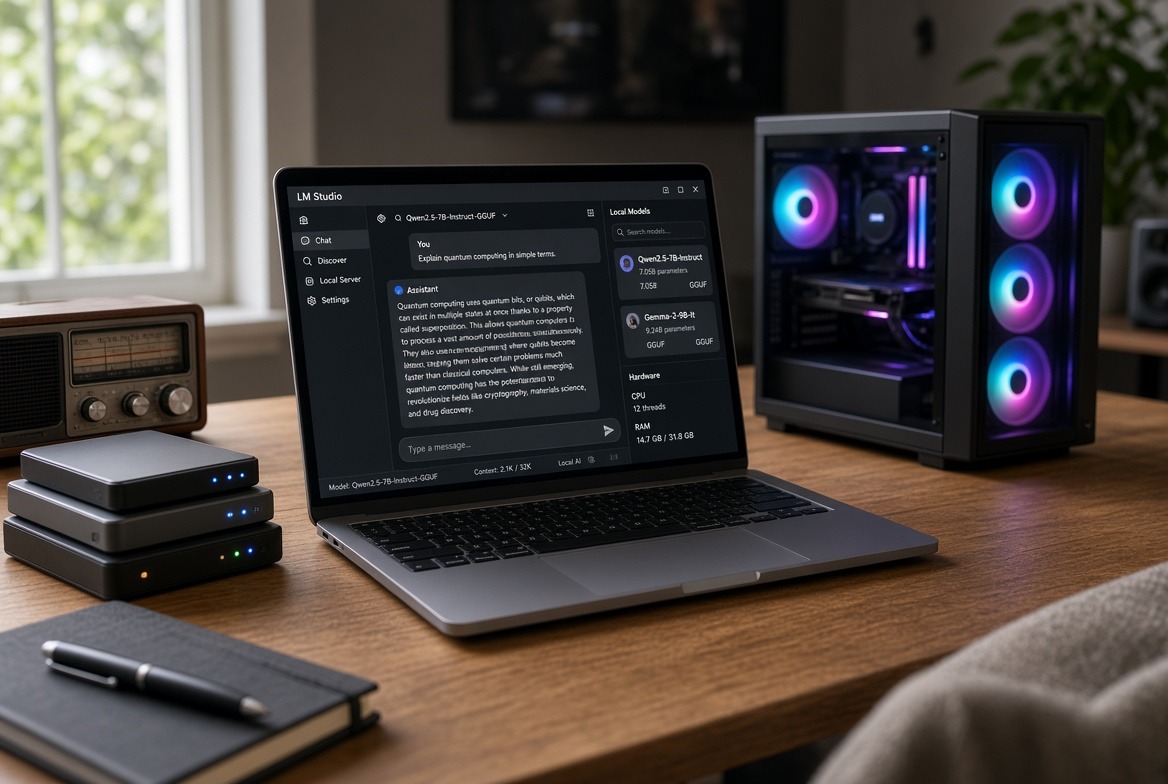
The Time Is Now To Install Local AI Is Now!
The models that run on the computer in front of you now match the capability of the leading cloud systems from late 2024 and early 2025. A modern laptop or desktop with 16 or 32 gigabytes of memory can load a quantized model that handles writing, research, coding assistance, and document work at a level that required a remote server two years ago. Once the file is on disk the conversation stays local. No account is required. No subscription is required. The machine does not need to reach a remote service to answer.
This article is sponsored by Read Multiplex Members who subscribe here to support my work: Link: https://readmultiplex.com/join-us-become-a-member/
It is also sponsored by many who have donated a “Cup of Coffee”. If you like this, help support my work: Link: https://ko-fi.com/brianroemmele
The Blue Open Source AI Freeze Is Ahead
That practical fact has become more important as the distribution of AI models has grown more constrained. Governments have applied export controls and temporary restrictions on frontier models. Major providers have updated usage policies to limit deception campaigns, certain weapons-related software, and surveillance uses. Customer vetting for the most advanced systems has expanded. China has proposed adding large model weights to export catalogues.
If you read the news yesterday, you saw how fragile the largest supporter of open source AI models is, with the fall of the CEO of Nvidia. Although it is early days, it is very clear many elements of conspired to accelerate his demise.
In the short term, it appears Nvidia continues to release open-weight models such as the Nemotron series and has contributed orchestration tools to open foundations, yet the broader environment around open weights is no longer one of simple expansion. The open internet itself has narrowed: many sources now sit behind logins, paywalls, or regional blocks. The historical pattern is familiar. Control of the printing press limited who could publish. Later controls on broadcast and early networks limited who could reach a wide audience. The same pressure now applies to the weights and the interfaces that generate answers.
A local model does not eliminate every constraint. It does remove the daily dependence on a remote service that can change its rules, raise its price, or become unavailable. The files that fit on ordinary hardware today are the ones that remain under the owner’s control.

This guide assumes you have never downloaded an AI model before. LM Studio remains the simplest desktop application for this on Mac, Windows, and Linux. It is free.
Step-by-step install for a complete beginner:
- Open your web browser and go to lmstudio.ai.
- Click the download button for your operating system (Mac, Windows, or Linux).
- When the file finishes downloading, open it. On Windows double-click the installer and follow the prompts. On Mac open the .dmg and drag the application to your Applications folder. On Linux download the AppImage, make it executable if needed, and run it.
- Open LM Studio. The first time it may ask for permission to use network or storage; allow it.
- Click the Discover tab on the left. In the search box type a model name such as Qwen3.5 9B.
- Select a result that shows a GGUF file. Prefer one labeled Q4_K_M or similar. The download size appears next to each file. Choose one that leaves several gigabytes free on your drive and in memory.
- Click download. Wait until it finishes. Large files take time; leave the computer awake.
- Click the Chat tab. Select the model you just downloaded from the model dropdown at the top. Click load. The first load takes longer while the model enters memory.
- Type a simple question in the chat box and press enter. You should see a response. That is the full basic setup.
Official requirements are modest: Apple Silicon and macOS 14 or newer on Mac (Intel Macs are unsupported), sixteen gigabytes of memory recommended (eight gigabytes works for small models and short context), AVX2 or Snapdragon X Elite on Windows with sixteen gigabytes of system memory and at least four gigabytes of dedicated graphics memory preferred, and an AppImage on Linux for Ubuntu 20.04 or newer.
Memory decides the practical ceiling. Four-bit quantization typically requires roughly half a gigabyte per billion parameters plus overhead for the conversation cache. As of November 2026 the workable choices are consistent across multiple hardware guides:
| Memory available | Models that fit and work well | Typical download size | Good for |
|---|---|---|---|
| 8 GB | Qwen3.5 4B, Gemma 4 E4B or E2B | 3–6 GB | Short drafts, summaries, quick questions |
| 16 GB | Qwen3.5 9B, Gemma 4 12B; gpt-oss-20b as a stretch | ~7 GB (gpt-oss ~12 GB) | Everyday writing, research, light tool use |
| 24–32 GB | Gemma 4 26B A4B, Qwen3.6/3.8 27B, Qwen3.6-35B-A3B | 15–21 GB | Stronger writing, coding assistance, longer context |
| 48 GB and above | Higher-quality quantizations or larger mixture-of-experts models | Varies | Multi-model use, extended documents, agents |
On a Mac the processor and graphics share unified memory, so a 32 GB system can load models that would need a dedicated graphics card on a PC. On Windows or Linux the dedicated graphics memory is the primary limit; spill into system RAM slows generation. CPU-only inference is usable for the smallest models but slow for interactive work. Qwen3.5 9B is the model I start most people with on 16 GB machines. It leaves room for useful context and handles ordinary writing and research. Gemma 4 variants often add image support. At 24–32 GB the dense 27B Qwen models and the 35B mixture-of-experts versions become practical; mixture-of-experts designs activate only a fraction of parameters per token and can feel faster than a dense model of similar total size.
Once a model is loaded, move ordinary work onto it. Summaries of articles or notes, rewrites of email drafts, explanations of technical passages, first drafts of short pieces, and extraction of key points from pasted text all run well. Questions that stay inside the model’s training knowledge or that you can supply as context in the chat work reliably. Questions that require fresh web results, private databases, or long multi-step tool chains are better left for later or for a hybrid setup. Start with the tasks you already do repeatedly and measure whether the local answer is good enough. Most people find that a large fraction of daily AI use moves over within days.
LM Studio also supports document work without leaving the machine. You can attach PDFs, text files, Word documents, and Markdown directly in a chat. If the document fits the model’s context it is included whole; if it does not, the application chunks and embeds it for retrieval. The default embedding model is nomic-embed-text-v1.5. This turns a static model into a private search over your own files. For more structured retrieval or for combining local documents with limited external tools, LM Studio supports the Model Context Protocol. You add MCP servers through a configuration file; models marked for tool use can then call search, file, or other tools. Keep the tool count low on smaller models so selection remains reliable. The combination of a local model plus document attachment or a simple MCP server covers the majority of private research and drafting tasks that previously required a cloud service.
The files and the application sit under your control. When a remote service changes its rules, raises its price, or becomes unavailable, the local copy continues to run. That is the practical sovereignty available today on ordinary hardware. The ability to keep a capable model on your own machine is one of the clearest expressions of individual technical freedom now available: you own the weights, you control the interface, and no third party can revoke the capability once the files are on disk.
What has taken place over the last few weeks I implore you to install local AI Models NOW!
Support This Work, You Will See It No Place Else
To continue this vital work documenting, analyzing, and sharing these hard-won lessons before we launch humanity’s greatest leap: I need your support. Independent research like this relies entirely on readers who believe in preparing wisely for our multi-planetary future. If this has ignited your imagination about what is possible, please consider donating at buy me a Coffee or becoming a member. Value for value you received here.
Every contribution helps sustain deeper fieldwork, upcoming articles, and the broader mission of translating my work to practical applications. Ain ‘t no large AI company supporting me, but you are, even if you just read this far. For this, I thank you.
Stay aware and stay curious,

🔐 Start: Exclusive Member-Only Content.
The rest of this article is for Multiplex members
You’ve reached the members-only part. Log in to keep reading right here, or join to unlock it.
- Full member-only articles: insights, wisdom and executive summaries
- The Multiplex members forum
- Member benefits and discounts
Already a member? You’ll come right back to this article after logging in. Forgot password?
Membership status: Not logged in
🔐 End: Exclusive Member-Only Content.
~—~
~—~

~—~
Support ReadMultiplex at Multiplex.Tips

Support ReadMultiplex
Subscribe or donate by Bitcoin.
Copy address:bc1qkufy0r5nttm6urw9vnm08sxval0h0r3xlf4v4x

Send your receipt to [email protected] to confirm subscription.
Members
Become a member for full member-only articles, the Multiplex members forum, and member benefits and discounts.
 Past, present and future technology research + insights
Listen
🔊 Every article has a free “Listen to this ►” button. Hear it read aloud in your browser.
The Multiplex
- Advertise with us: Rates and booking
- X: @ReadMultiplex
- Buy a T-shirt: Multiplex.Love
- Program Guide: Multiplex.Today
- Podcast: Multiplex.Life
- Join the Multiplex team: Multiplex.Team
Stay updated
Get an email when we post new articles:
