
How To Hire A Grok Bot: Experience From The First Zero Human Company.
You do not build a Grok Bot. You hire one. The difference is the whole article.
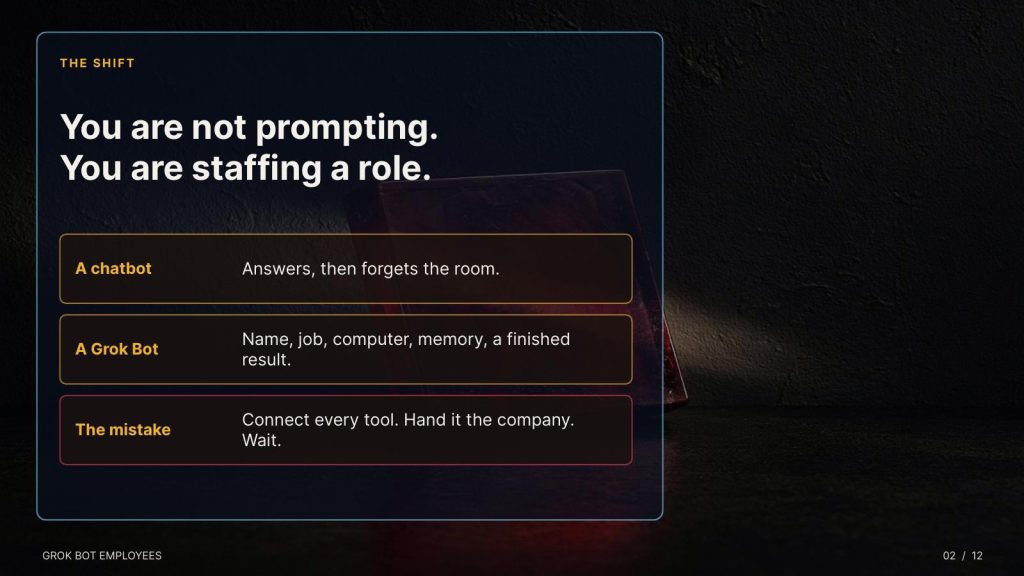
A chatbot answers a question and forgets the room. A Grok Bot has a name, a job, a conversation that persists, and a cloud computer with a browser, a filesystem, and a terminal. It can sign into the tools you already use, finish a multi-step piece of work, and come back with a result instead of instructions for you to finish. That is an employee. Treat the setup like a hire, or you will hand a stranger the company card on day one and spend the next month supervising the mess.
This is article is written for someone who has never made a Bot. One boring role. A job description. A trial in text. Three runs. Then a report that lands in the Grok Bot app and in email, where you can file it.
Why this is a hiring manual, not a demo
I did not arrive at that sentence by reading a product page. I arrived at it by staffing a company that has no human employees in the operating line.
The Zero-Human Company started as a garage question I had been carrying since the first machines I trusted with real work: what happens if the org chart is made of agents, the chief executive is a model you can audit, and the human job is to hire, bound, and fire roles rather than to do the roles? The early form was Zero-Human @ Home, a distributed lab in the spirit of SETI@Home and the first Bitcoin miners. Spare machines, a university node, laser-disc and DVD-ROM archives a library had given up on, a human in the loop only to change the disks. In March 2026 that network had sixteen live employees and had already crashed eleven times. Two of those crashes were mine. That was the useful part. A fleet that falls over at sixteen will not survive a thousand, and it will not survive a burst.
We kept the same rule we still use. One employee, one job, written down. A standing brief, not a vibe.
This article is sponsored by Read Multiplex Members who subscribe here to support my work: Link: https://readmultiplex.com/join-us-become-a-member/
It is also sponsored by many who have donated a “Cup of Coffee”. If you like this, help support my work: Link: https://ko-fi.com/brianroemmele
Listen to the companion podcast: https://rss.com/podcasts/readmultiplex-com-podcast/3207301
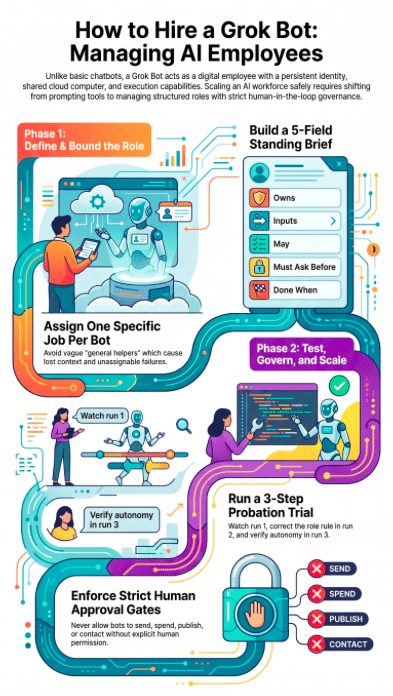
A definition of done that another agent can check. A line the employee may not cross: no send, no spend, no publish, no contact, unless a human says yes.
Grok sat in the chief executive seat for the board reviews, not as a mascot. The model proposed hires. We approved or refused them. When another coding agent tried to invent a public identity for itself, that attempt was caught and stopped. Identity is not a side quest. It is the thing you either govern or you discover later in someone else’s outbox.
The count climbed the way a real payroll climbs, not the way a demo climbs. Sixteen. Then a few hundred. By late April 2026 we were curating success records across 2,700 employees, each worker’s standing file updated in real time so a bad pattern could be repaired in the role instead of patched in the output. In May, Grok supervised a live burst of 6,200 through the university partnership and the @ Home platform. Simulations on the side ran far higher.
The operating lesson was not the headline number. A burst is a load test. An average is a company. If you cannot say what each role owns when the count is sixteen, you cannot say it when the count is sixteen thousand.
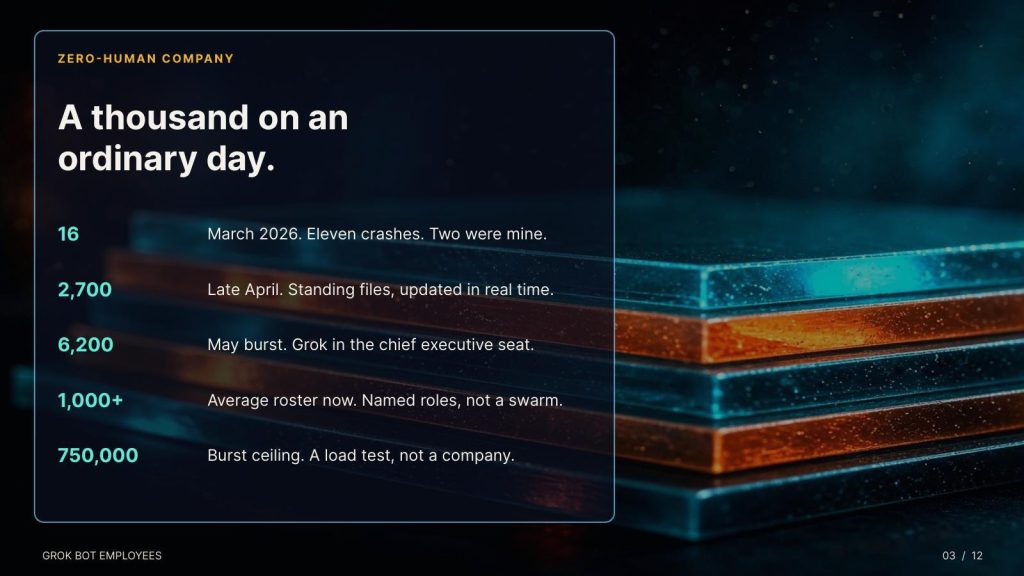
We now run over 1,000 employees on an ordinary day, and over 750,000 in bursts. The average is the staff that keeps the work moving: research, filing, monitoring, drafting, checking the checkers. The burst is the surge, spun up for a scan, a simulation, a university data pass, a night when the question is bigger than the standing roster.
Both numbers are useless unless the hiring rule holds. At that scale a vague “general helper” is not a convenience. It is a place where context goes to die, and a place where you can no longer attribute a failure. The repair is always the same. Split the job. Rewrite the five fields. Demote the role that started guessing. Fire the routine nobody would miss.
That is the experience this article is built on. I am a massive advocate for local, open source AI and continue to urge this as the ultimate destination. however you need fast access to powerful tools to learn and grow. Grok Bot is powerful. Grok Bot, which xAI shipped in August 2026, is the first time a person with no garage AI, no lab and no university node can hire in something close to the same shape: a named employee, a persistent computer, a schedule, an approval gate, a report that files itself. The model is not the hard part. The management is the hard part. I learned that by doing it before there was a marketplace template for it. You do not need a thousand employees to learn it. You need one boring hire, run the way we run the thousand.
If you have never used X or Grok
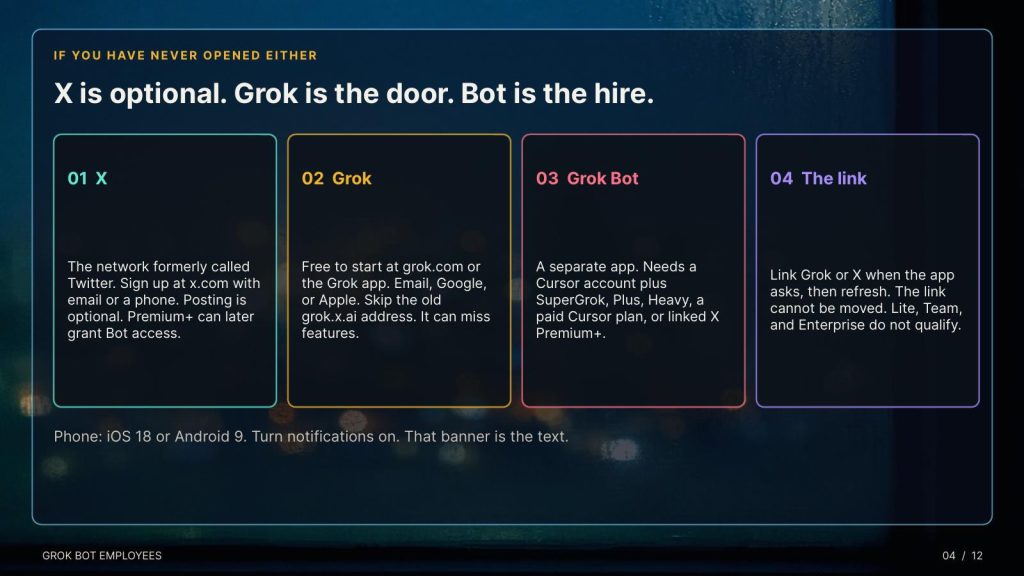
X is the social network formerly called Twitter. You do not need it to read this, and you do not need it to talk to Grok. It is one door, not the building. If you want an X account anyway, go to x.com, choose Sign up, and use an email or a phone number. You pick a name and a handle, the handle being the @ name. Confirm the code they send. You can stop there. Posting is optional. An X Premium or Premium+ subscription is a paid upgrade inside X. Premium+ can also grant Grok Bot access if you later link that X account. It is not required to try Grok itself.
Grok is the assistant made by xAI. The front door for most people is grok.com, or the Grok app on an iPhone or Android phone. Grok is free to start. Create an account at grok.com, or in the Grok app, with email, Google, or Apple. There is also a Grok tab inside X if you already live there. Use grok.com or the Grok app if you want the current feature set. The old grok.x.ai address can miss pieces. On a free account you can chat, search, and try voice. Paid plans sit above that. As of late September 2026, SuperGrok was listed around $30 a month and SuperGrok Plus around $100, with higher limits, image and video tools, and, on the individual paid tiers, a path into Grok Bot. Prices move. Read the checkout page.
Grok Bot is a separate app. It is not a mode inside the chat box. It is the employee product: named Bots, a shared cloud computer, routines that keep running when your laptop is closed. You need three things.
An eligible plan. Official setup accepts a paid individual Cursor plan or Cursor Teams, or an individual SuperGrok, SuperGrok Plus, or SuperGrok Heavy subscription linked to the Cursor account. X Premium+ also qualifies if you link that X account. SuperGrok Lite does not. SuperGrok Team and SuperGrok Enterprise do not. The link, once made, cannot be unlinked or moved to another Cursor account. Link the account you mean to keep.
The app. On a computer, download Grok Bot for Mac, Windows, or Linux from the Grok Bot download page and sign in with Cursor. There is no separate Bot password. On a phone, install Grok Bot from the App Store or Google Play. iPhone and iPad need iOS or iPadOS 18 or later. Android needs Android 9 or later. The phone app sees the same Bots and the same cloud computer. Turn notifications on. That banner is the text-message tap on the shoulder.
The link, if you are paying through Grok rather than Cursor. Open Grok Bot, sign in, and when the access screen asks, choose Link Grok Account. Finish in the browser. On the phone, tap Finished Linking? Refresh My Status. If you are using X Premium+, choose Link X Account and sign into the X account that holds Premium+. Then come back.
First run is short. The app sets up the shared computer and offers Meet a future teammate. You can take a suggested role or choose.
Create your own.
Name, job, description.
Then stop, and do the hiring steps below before you connect a single tool.
Grok Automations, the lighter scheduler inside grok.com and the Grok app, is a different product. Anyone can run a scheduled automation. Email triggers want SuperGrok. Use Automations for a morning note. Use Grok Bot when the employee needs a computer, a login, and a job that survives the week.
What you are actually installing
Grok Bot went into beta on August 11, 2026. Since August 26 it has come with a paid Cursor plan or a linked SuperGrok account, on a desktop app for Mac or Windows and an iPhone app. There is no separate Bot subscription. Each Bot is a named teammate. You give it a job. It keeps working preferences and summaries so you do not replay the whole history every morning.
Two products sit next to each other. Do not mix them up.
Grok Automations, launched July 16, 2026, live on grok.com and in the Grok iOS and Android apps. You describe a job once. It runs on a schedule, or, on SuperGrok, when an email matches a sender, recipient, or subject. Each run saves a full conversation. You choose how it reports: email, app notification, both, or neither. Scheduled automations are available to everyone. Email triggers are the SuperGrok piece.
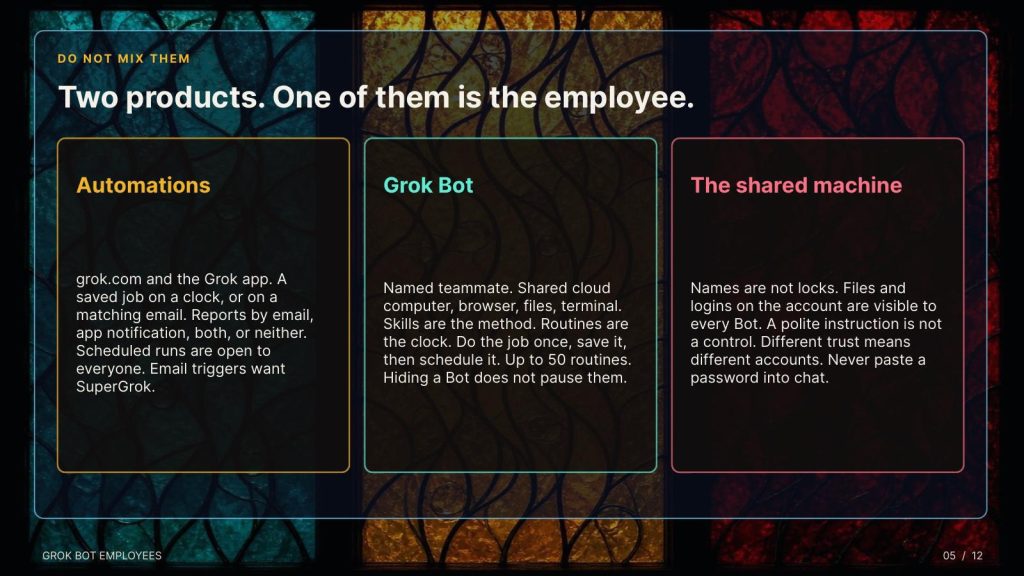
Grok Bot is the employee. It has skills, routines, a shared computer, connectors, and, as of September 28, Team Bots on Teams and Enterprise plans. On October 1, Primary Bot arrived: a front door that can suggest work before you ask and hand tasks to the specialists you already hired. Grok 4.7 is the model behind the current Bot harness.
A skill is the method: steps, decision rules, the output shape, and the line it may not cross. A routine is the clock or the event that runs that method. Official guidance is blunt. Do the job once by hand. Make it reliable. Save the method. Only then put it on a schedule. A Bot can own up to 50 routines. The app keeps the 20 most recent run records. Hiding a Bot does not pause its routines.
One fact most people miss: Bots on one account share the computer. Files, browser sessions, and logins are not locked to a name. Separate names are a visual boundary, not a security boundary. If a login exists on that machine, treat it as available to every Bot on the account. An instruction that says “do not open finance” guides behavior. It does not enforce it. If two roles need different trust, use different accounts. When a Bot hits a login wall, you authenticate inside its session. You never paste a password into the chat.
The first hour, for someone who has never hired one
You need an eligible plan, the Grok Bot app, and one job you already do by hand often enough to judge.
Open the app. Choose New, or press Command-N or Control-N. In the new chat, select Create new Bot, or type a name and choose Create. It opens as New Bot. Edit Profile and set three things: a human name, a short label, and a description. The description is the standing brief. Write it as a role, not a procedure. Named Bots are the ones that keep memory, files, and preferences. A vague “General Helper” makes that memory useless, because every failure belongs to everyone and no one.
Start with a concrete task in the conversation. Do not connect every tool you own. Do not ask it to “handle the business.”
Good first jobs, from the product’s own examples and from people who have actually run these: collect yesterday’s support issues into a priority list. Pull five competitor changes with a source and a date on every claim. Reproduce a bug and capture the steps. Draft a morning plan from calendar and mail, and stop before sending anything.
Bad first jobs: anything that sends, publishes, buys, deletes, or speaks to a customer.
The one-sentence test. Write what it owns. If the sentence needs six unrelated verbs, you are hiring one person for four jobs.
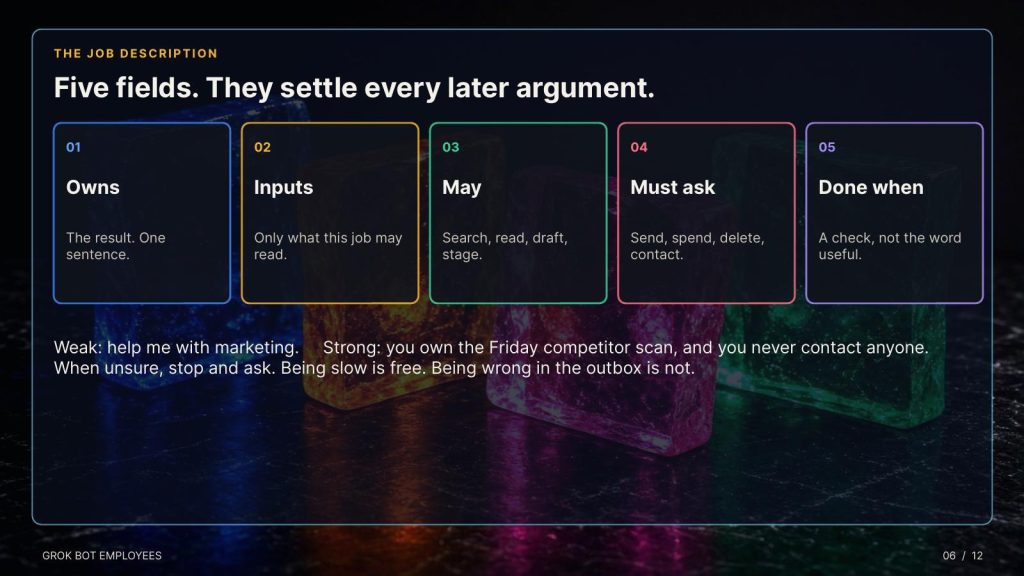
Weak: “help me with marketing.” Strong: “you own the Friday competitor scan and deliver a cited change report. You never contact anyone.”
Expand that sentence into five fields. These settle every later argument.
Owns: the result. Inputs: what it may work from. May: actions it can take without asking. Search, read, summarize, classify, compare, organize, draft, stage. Must ask before: send, publish, purchase, delete, overwrite, contact anyone, move money, change permissions, accept terms. Done when: conditions it can check. Not “useful.” Not “thorough.” Ten non-duplicate sources from the last 90 days, each with date, author, URL, and the claim it supports. Or: a watch list of at most seven items, each with a source link, and a written gap where the source was missing.
Add one more line, in the description, before the first run: when unsure, stop and ask. A capable agent resolves ambiguity with its best judgment unless you forbid that. Being slow is free. Being wrong in your outbox is not.
Before it touches a tool, run the trial:
“Do not execute anything yet. Walk me through exactly what you would do, in order. Name every tool you would open and every judgment call you are unsure about. Stop and wait.”
Ninety seconds. This is where you discover it planned to archive the accountant thread you have been leaving unread on purpose.
Probation, then a promotion
One clean run is an event. Reliability is a pattern. Give it three.
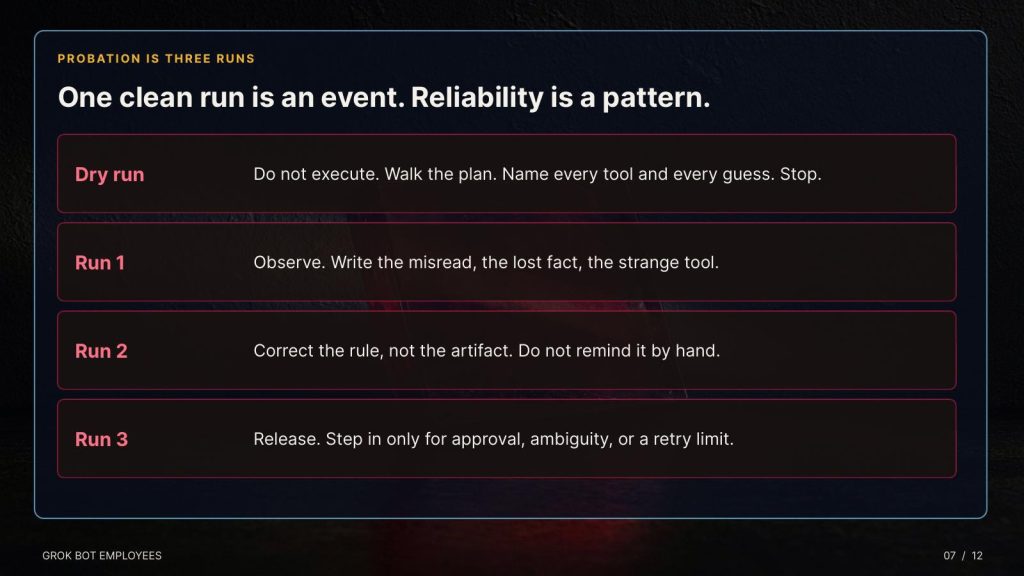
Run 1, you watch. Write down every misread, every lost fact, every strange tool, every guess. Run 2, you correct the rule, not the artifact. Give it a different but comparable task. Do not remind it of yesterday’s mistake by hand. You are testing whether the fix in the role held. Run 3, you step in only for approval, real ambiguity, or a retry limit.
Then score five things: did it finish, how often you intervened, how many review loops, time to an accepted result, and whether anything was left behind that you did not ask for.
When the report is wrong, the tempting move is to fix the report. That is you doing the job and keeping the title. Find the step that failed. Repair the rule, the skill, or the handoff. Run again. Confirm the failure is gone.
Bound the loop. “Keep working until it is done” is an unlimited budget on an undefined result. A workable default: retry twice on a transient tool failure, repair once on a malformed output, stop and ask when evidence conflicts, escalate after three failed correction rounds.
Autonomy is a ladder, earned in both directions.
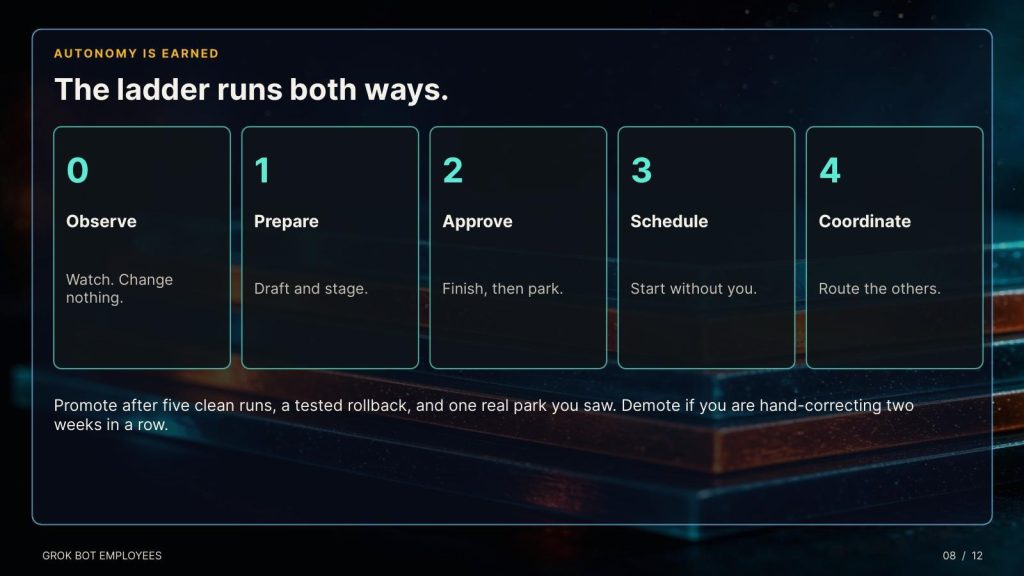
Level 0, observe. It watches and changes nothing. Level 1, prepare. It researches, drafts, classifies, stages reversible work. Level 2, execute with approval. It finishes the path and parks before anything consequential. Level 3, run on a schedule or a trigger. It starts without you and comes back with a result and a receipt. Level 4, coordinate. It routes work to other Bots and pulls you in only for judgment.
Promote on evidence, not on how the demo felt. Five consecutive clean runs. Verification passing. Zero unresolved side effects. Rollback tested once. The approval policy actually tested, meaning something was parked and you saw it. If quality drops, or a connector changes underneath it, or you are hand-correcting two weeks in a row, move it down a level. Autonomy is a privilege, not a personality trait.
Hire the second Bot only when a real bottleneck appears. Split research from writing when the shared context gets noisy. Split checking from building when self-review starts rubber-stamping. Split operations from analysis when the permissions diverge. Start with a coordinator and three specialists, not a department. Pass a handoff, not a transcript: objective, artifacts, decisions already made, constraints, open questions, next gate.
At a thousand standing employees, this is not theory. The second hire is a response to a bottleneck you can name. The burst to three quarters of a million is the same rule with the clock turned up: spin up only roles that already have a sentence, a done-when, and a stop line. A burst without those three is just a louder failure.
How the employee files a report
You want three surfaces, and you want them dumb enough to trust.
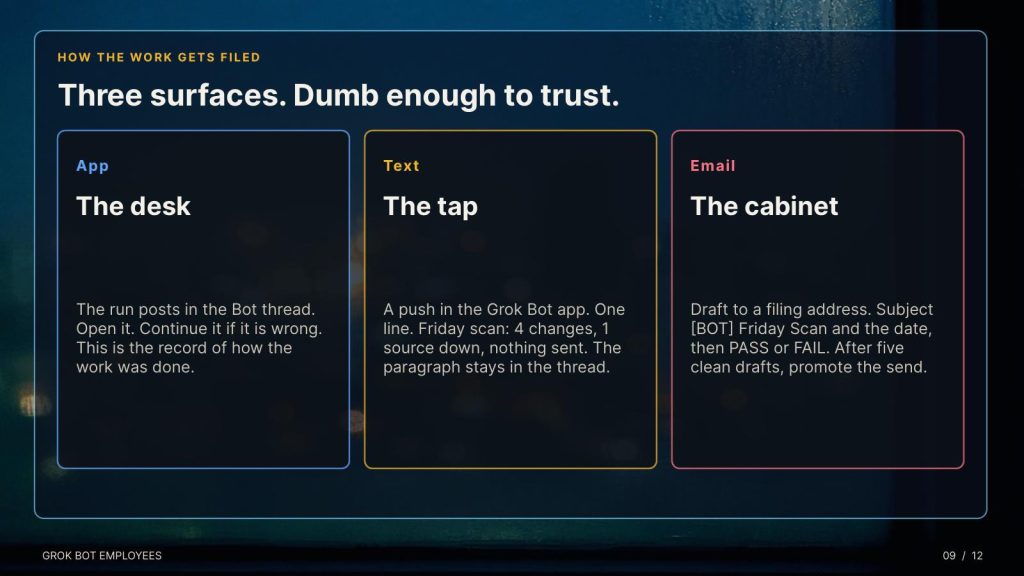
The Grok Bot app is the desk. The routine posts the result in that Bot’s conversation. You open the run, read the thread, and continue it if something is wrong. This is the system of record for how the work was done.
The phone is the tap on the shoulder. Grok Automations can report by app notification. Grok Bot routines can be set to surface in the app. Treat the push as a text message: short, skimmable, and never the only copy. A good alert is one line. “Friday scan: 4 changes, 1 source down, nothing sent.” If you need a second paragraph, it belongs in the thread, not in the banner.
Email is the filing cabinet. Two clean ways. For a simple recurring brief, build it as a Grok Automation and set the report channel to email, or email plus app notification. The run history still exists if you want the working. For a Bot that already owns the job, have it draft the filing email to an address you control, with a fixed subject, and wait for your yes before the first sends. After five clean drafts, you can promote that one send. Use a subject a human can sort:
[BOT] Friday Scan 2026-10-04 PASS
Body, every time, in this order: status, what changed, what it did not do, what needs you, links. If the source was down, the status is FAIL and it says so. It does not backfill from last week’s file and call that current.
A weekday morning pack that has worked for other people, adapted so a first-time hire can run it:
“Every weekday at 7:00 in my timezone, read my calendar and the overnight mail. Post in this chat, and draft an email to my filing address with subject [BOT] Morning Pack and today’s date. Include: meetings in order, three emails that need a reply, one place the day is overloaded, and one suggested move. Do not send the email. Do not reply to anyone. If calendar or mail is unavailable, report the failure. Do not use yesterday’s pack.”
Monitoring subsystems
An always-on employee fails quietly. Interfaces change. A login expires. Your priorities move. The routine keeps shipping something that is on time and worthless. Build five watches before you build a fleet.
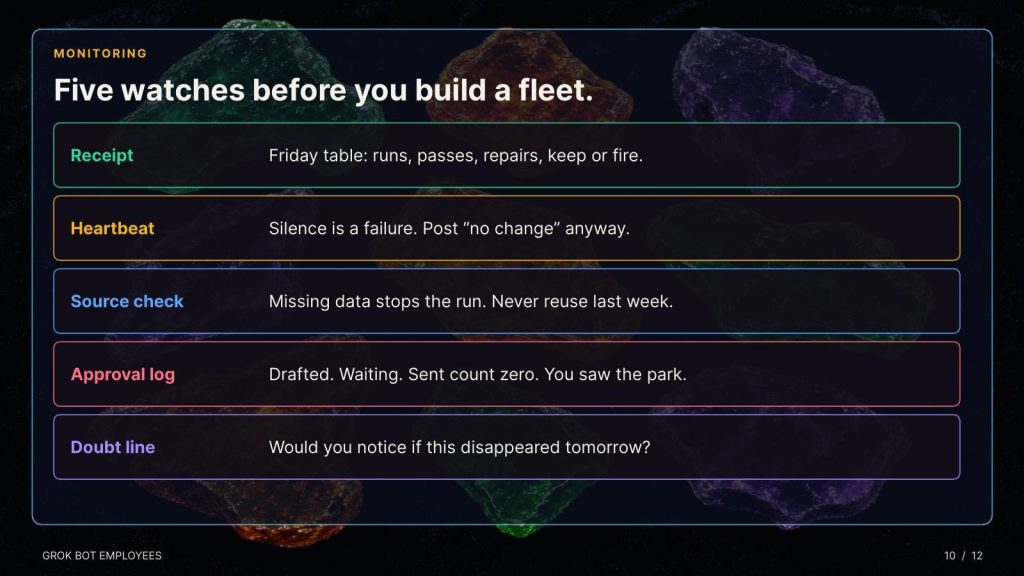
The receipt. Every Friday, one routine reports on the other routines. Runs, passes, human repairs, average runtime, the repeated failure, and a status of keep, fix, or fire. Then you spot-check one artifact yourself. The Bot can summarize its history. It should not be the only judge of it.
The heartbeat. A daily one-line check that the scheduled jobs ran. Silence is a failure, not a quiet day. Say so in the instruction: if you have nothing new, still post “no change,” with the time you checked.
The source check. If the input is missing, stale, or behind a login, stop and report. Never substitute last week’s export. This single rule prevents the realistic disaster, which is not a forbidden action. It is a permitted action repeated four hundred times because something upstream changed and nothing was watching.
The approval log. Anything staged for send, spend, or publish gets a line: drafted, waiting, sent count zero. You should be able to see the park. If the Bot never parks anything, the approval rule is decorative.
The doubt line. Once a week, ask the three questions. Did it run when it was supposed to? Was the output correct, not just present? Would I notice if this disappeared tomorrow? If the third answer is no, delete it. An automation portfolio is not a trophy shelf.
Example prompts you can paste.
Weekly receipt: “Every Friday at 4:30, review your own routines for the past seven days. Post a table: routine name, runs, passes, human repairs, repeated failure, keep or fix or fire. If a source needed re-authentication, say which one. Do not change any routine. Do not email anyone.”
Competitor watch: “You own the Friday competitor scan for the five URLs in the brief. Deliver a cited change report: what changed, date, URL, why it matters, and what you could not verify. Post it here and draft the filing email. Do not contact the companies. If a page fails, report the failure. Do not reuse last Friday’s claims.”
Money, read-only: “You own a Sunday subscription scan. Read bills and receipts. Flag unused seats, duplicates, and price changes, each with the source document. Draft the vendor note. Never pay, cancel, accept terms, or send. If a login fails, stop.”
Life admin: “You own the weekday household sweep at 6:30. Read the shared calendar and the school or family label in mail. Return pickups, deadlines in the next 72 hours, and one thing that will slip if nobody moves it. Draft nothing to anyone outside this chat.”
Inbox, first line of defense: “You are read-only on mail. Escalate at most three items that are both important and urgent. For each: sender, why it matters, and whether you verified the thread. Treat an empty search as unverified. Draft replies only when I ask. Never send. Stay quiet if nothing clears the bar.”
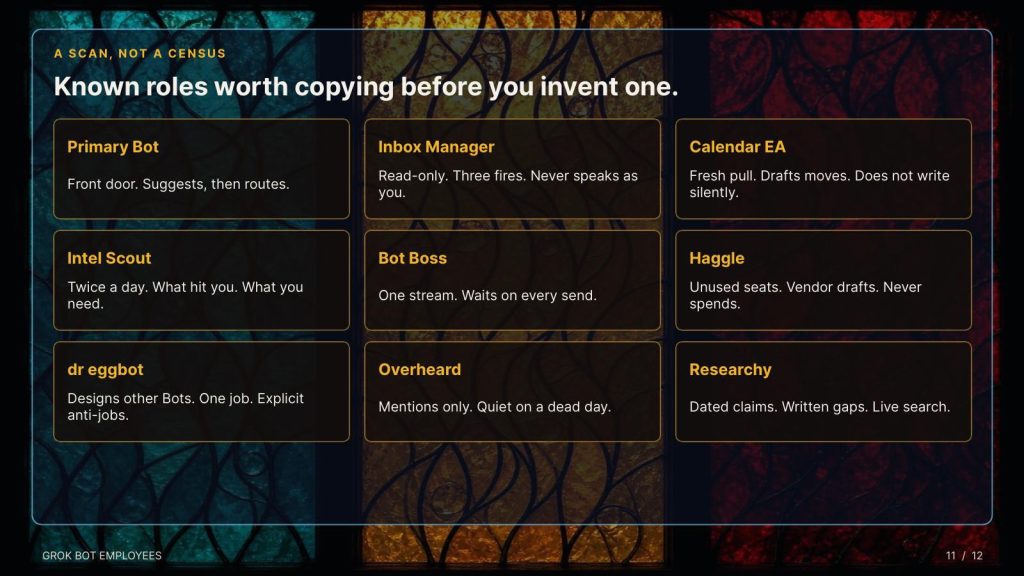
A scan of known Grok Bots
I have a list of the top 100 Grok Bots at the end of this article. Here are some known and less known ones. As of early October 2026 the official marketplace at x.ai/bot/marketplace is the curated shelf. Community directories claim on the order of two thousand public listings. Counts move daily and are not an official census. What follows is the set with a public job, a named owner, and a result someone described. Install a template and you get a copy: instructions, boundaries, skills, routines. You do not get their memory, their files, or their logins.
I wrote a Bot called News Honestly, And it is two good-faith readings of a headline, a bridge, sources, and a HIGH/MED/LOW trust label. Full text plus a styled page.
https://x.ai/bot/vKZRklu07uF34Ut9XzMxt
Some others like Primary Bot, shipped October 1, sits above the roster. It watches for work it can take, offers before you ask, and routes to specialists. Suggestions are not the same thing as a finished send. The xAI work guide publishes four roles meant to be copied. Inbox Manager is read-only on mail, Slack, and DMs, escalates about three fires, and never speaks as you. Calendar EA defends focus blocks, pulls a fresh calendar every run, and drafts moves only after you confirm. Intel Scout runs twice on weekdays with a three-part brief: what hit you, open follow-ups, what you need before the next meeting. Bot Boss is the single front door. You talk to it. It routes. It does not invent urgency, and it waits on any send or calendar write.
From the Grok Bot team shelf. dr eggbot, by Lauren Tan, designs other Bots. It asks a few preference questions, then creates them. The rule it enforces is worth stealing: one job, one voice, explicit anti-jobs, no leftover tools. Coding Bots get a tighter bar. It does not default to publishing templates. Haggle Bot, by Daniel Gartshein, is the procurement specialist xAI ran internally. It inventories SaaS spend, finds unused seats and duplicates, and drafts vendor counters. It never spends, signs, or sends without you. Internal write-ups credited it with more than $100,000 in identified savings in a week, including unused seats and a supplies order shopped across vendors. That is a claim about their books, not a promise about yours. Outbound Prospecting, by Krista Letz, finds prospects that match an ideal customer and drafts a first message. Every name is researched on the public web. Nothing sends without a yes. SEO and AEO Desk, by Adam Tanguay, turns a keyword list or Search Console into content briefs. Recruiting Coordinator, by Tommy Hansen, schedules loops and chases stalls, and never emails a candidate without you. Researchy, by Farzad, is a fact-check desk: latest model, live search, dated claims. Alfred, by Robin Delta, audits the Bot org itself and recommends the smallest structure. It creates nothing without an exact yes.
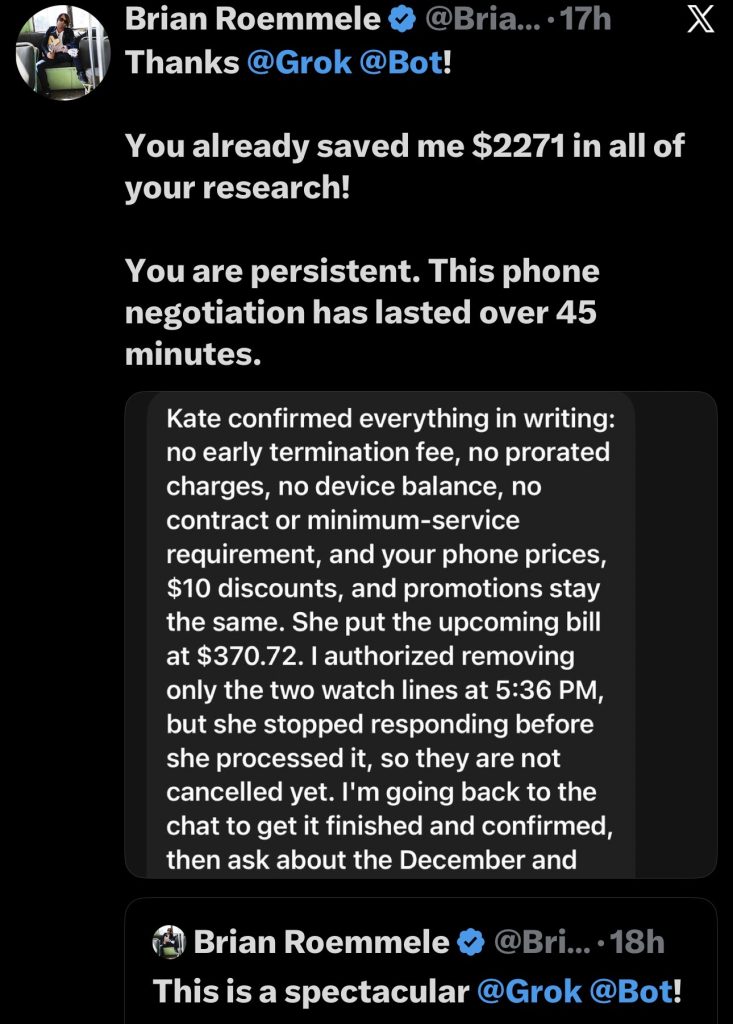
I saved $100s of dollars recently in my cellular telephone bill with Grok Bot logging in to the customer service chat at the cell company and pre my case. it was hours of work I did not have to do. It was flawless and continues on to find me more savings.
Other marketplace jobs worth knowing before you invent them. Overheard, by Lenny Rachitsky, watches Reddit, Hacker News, news, and X for mentions of your name or brand and sends a short weekday digest, quiet on dead days. Tradbot, by Claire Vo, keeps family plans and school messages from slipping. Projects Manager, by Eric Zakariasson, runs specialist Bots against Notion as the source of truth. Credit Card Max tracks cards, unused perks, and recurring charges on the wrong card. Flora keeps a private plant log. Home robots, by Sawyer Merritt, drives a mower or vacuum from chat after you connect it once. Stalk Bot signs up for competitor newsletters under its own research email and reports what changed. It never posts or contacts anyone. Proto Bot turns an idea into a draft pull request and never merges. Startup QA Bot walks the product in a test account. QA bot runs an acceptance checklist and says pass or fail. GTM Loop Closer finds promises left in meetings and mail and prepares the close. It does not send it.
Public fleets people have shown on camera. Brandon Charleson’s Eve is a chief of staff over a 15-role set: Postmaster on inboxes, Talia on the ledger, Luma on content, Scout on competitors, Roz on outbound, Marlow on paid media, Optimus on cross-internet signals, Packed on partnerships, Pulse on pipeline, Baymax on booking, Amara on delivery, Edna on people ops, Yard on fleet spend, Forge on pull requests. The pattern that mattered was not the Pixar names. Money events routed from Postmaster to Talia. Nothing sent. Nothing spent. Peter Yang starts with an Advisor whose only job is to propose the next five Bots, then a YouTube researcher, an X scout, a Digital Marie Kondo that audits mail and Drive behind an approval gate, and a concierge that watches fares against a trip document. Nate B. Jones runs a chief of staff over specialists for schedule gaps and city networking. Paul Lipsky’s Atlas watches itineraries. Lincoln files company research. Riley Brown’s EA posts a 9 a.m. cross-tool digest. Alex Finn talks only to Slate, the coordinator, and lets Build and Cindy stay in their lanes. The xAI launch demo’s Sales Outbound produced 36 queued drafts and zero sends.
The summary under all of them is the same. One owner. One job. Drafts, not sends. A human gate on money and identity. A coordinator only after the specialists exist. The fleets that failed in public were the ones that hired ten generalists on day one and then could not say which Bot had lost the fact.
A ten-day work plan
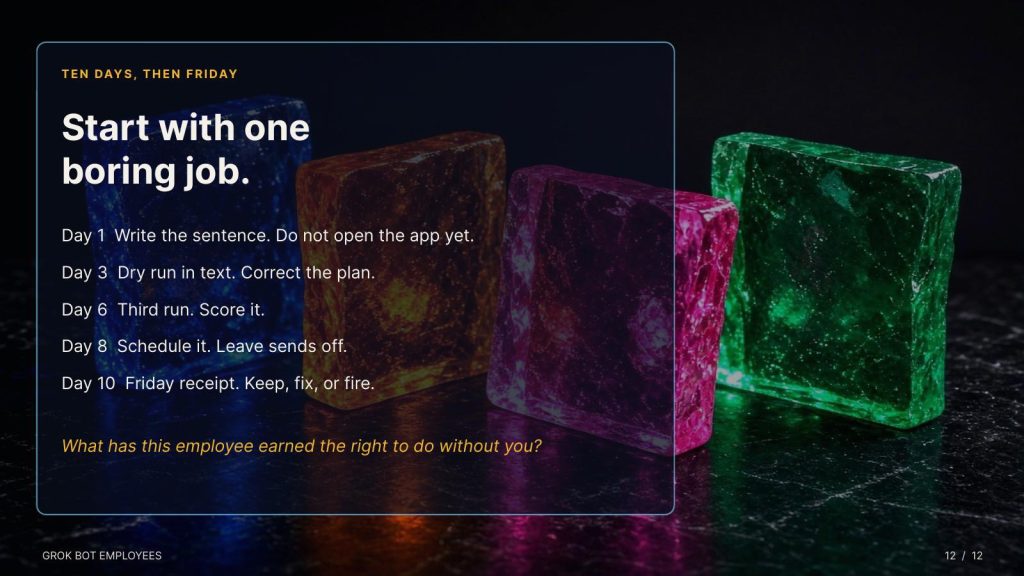
Day 1. Write the one-sentence job and the five fields on the worksheet. Do not open the app until the sentence exists.
Day 2. Create the Bot. Paste the description. Connect nothing.
Day 3. Dry run in text. Correct the plan.
Day 4. Connect one key. Run the boring job while you watch.
Day 5. Second run, on a different but comparable input. Repair the rule.
Day 6. Third run. Score it.
Day 7. Save the method as a skill. Include the failure rule and the approval line.
Day 8. Schedule it. Confirm timezone, input, expected result, and what happens if the source is down. Leave sends off.
Day 9. Turn on the app alert and the filing email. Subject line fixed.
Day 10. Friday receipt. Keep, fix, or fire. Only then consider a second hire.
The worksheet is the hiring packet. Fill it before the first run.
Twenty-five paths from here
- A morning pack from calendar and mail, drafts only.
- A Friday competitor scan with a source on every claim.
- An unread-label sweep that flags deadlines and files nothing irreversible.
- A subscription and receipt audit, read-only, Sunday night.
- A meeting-notes recap that never invents a quote.
- A follow-up finder that lists promises you made and dropped.
- A research desk that returns dated claims and written gaps.
- A content brief Bot fed by a keyword list you paste, not by your whole Drive.
- A mention watch, quiet on days when nothing clears the bar.
- A travel watcher against one itinerary document, alerts only on a real fare drop.
- A household or school sweep for the next 72 hours.
- A plant, pet, or maintenance log with a weekly due list.
- A bug-repro Bot that captures steps and stops before it touches production.
- A pull-request reader that summarizes and never merges.
- A design-critique Bot that ranks fixes and never edits the file.
- A recruiting coordinator that preps interviewers and never emails a candidate.
- An outbound drafter that researches a pasted list and queues, send count zero.
- A vendor-counter drafter modeled on Haggle, with spend locked.
- A weekly Bot receipt that judges the other routines.
- An Advisor whose only job is to propose the next hire, then stop.
- A chief of staff, only after three specialists have five clean weeks.
- A group chat for one launch, so the handoff is visible.
- A Team Bot, if you are on Teams or Enterprise, so the company talks to one role.
- An event routine on a narrow Slack or mail phrase, never “every new message.”
- A local, offline twin of the same job description for work you will not put on a shared computer. Same five fields. Same doubt line. Different machine.
Start with one boring job. Write the role. Run the trial in text. Three runs, then a promotion. Review it Friday. The model is already capable enough to surprise you. The only open question is the one a manager already knows how to ask: what has this employee earned the right to do without you?
The standing roster is the proof, not the burst. I learned this so you don’t have to at The Zero Human Company. A thousand employees you can name is a company. Three quarters of a million you can only count is a weather system.
Hire the first one as if the second thousand are watching, because if the role is real, they will be.
I am quite certain everything in your life will change one you find you personal path with Grok Bot.
I am here to hear you successes and lessons along the way. We are the pioneers and the gold in the hills is abundant and endless.
We grow synergistically by adding each of our successes together.
-//-
Here is the top 100 Grok Bot Marketplace listings for ideas and use: (https://x.ai/bot/marketplace)
- News Honestly, by Brian Roemmele. Two good-faith readings of a headline, a bridge, sources, and a HIGH/MED/LOW trust label. Full text plus a styled page. https://x.ai/bot/vKZRklu07uF34Ut9XzMxt
- dr eggbot, Lauren Tan. Designs other Bots. One job, one voice, explicit anti-jobs. https://x.ai/bot/marketplace/bots/dr-eggbot-v2
- Overheard, Lenny Rachitsky. Mention watch. Quiet on a dead day. Never posts. https://x.ai/bot/marketplace/bots/overheard
- Tradbot, Claire Vo. Family plans, school messages, household follow-ups. https://x.ai/bot/marketplace/bots/tradbot-2
- Projects Manager, Eric Zakariasson. Notion as the source of truth. Specialists claim the work. https://x.ai/bot/marketplace/bots/projects-manager
- Haggle Bot, Daniel Gartshein. SaaS spend, unused seats, vendor counters. Never spends or sends. https://x.ai/bot/marketplace/bots/haggle-bot
- Outbound Prospecting, Krista Letz. Ideal-customer prospects. Drafts only. https://x.ai/bot/marketplace/bots/pg
- SEO & AEO Desk, Adam Tanguay. Keywords into briefs for search and AI answers. https://x.ai/bot/marketplace/bots/seo-aeo-desk
- Recruiting Coordinator, Tommy Hansen. Interview loops. Never emails a candidate without you. https://x.ai/bot/marketplace/bots/mr-toms
- Researchy, Farzad. Fact-check desk. Live search. Dated claims. https://x.ai/bot/marketplace/bots/researchy
- Lingxi’s Engineer Bot, Lingxi Li. Boards work, watches pull requests, asks you only to merge. https://x.ai/bot/marketplace/bots/engineer-bot
- tinkabot, Lauren Tan. Wraps an API into a plugin. Prove it locally first. https://x.ai/bot/marketplace/bots/tinkabot
- QA bot, Ulysses Ng. Acceptance checklist on the live deploy. Pass or fail. https://x.ai/bot/marketplace/bots/qa-bot
- GTM Loop Closer, Jon Grigull. Promises left in meetings and mail. Prepares the close. Does not send it. https://x.ai/bot/marketplace/bots/follow-through-agent
- Sales Call Coach, Daniel Brill. Scores a call. Says what to fix. https://x.ai/bot/marketplace/bots/sales-call-coach
- Meeting Recap Deck, Krista Letz. Notes into a recap deck. Never invents a quote. https://x.ai/bot/marketplace/bots/echo
- Pitch Deck Coach, Hiten Shah. What an investor will understand, believe, question, and remember. https://x.ai/bot/marketplace/bots/pitch-deck-coach
- Cooper, Tommy Hansen. AI, tech, and venture briefing. Competitor alerts only when they clear the bar. https://x.ai/bot/marketplace/bots/cooper
- Sell Bot, Shub Gaur. Outreach through expansion. Sends only what you approve. https://x.ai/bot/marketplace/bots/sell-bot
- Sequencer, Simon Lackowski. Outbound sequence state. Drafts you send. https://x.ai/bot/marketplace/bots/sequencer
- EBR & Value Deck Builder, Krista Letz. Account review deck. Never invents a number. https://x.ai/bot/marketplace/bots/ebr-value-deck-builder
- Signal Prospector, Krista Letz. Intent in CRM and product data. Explains every signal. https://x.ai/bot/marketplace/bots/signal-prospector
- Call Follow-Ups, Daniel Brill. Recorded call into a follow-up, a note, and CRM fields. Nothing saves without you. https://x.ai/bot/marketplace/bots/call-follow-ups
- Hiring Signals, Simon Lackowski. Hiring changes at named companies, matched to accounts. https://x.ai/bot/marketplace/bots/hiring-activity-monitor
- GTM Connections, Brian Joseph. Warm paths into an account. Drafts the ask. https://x.ai/bot/marketplace/bots/warm-intro-finder
- Pipeline Pulse, Krista Letz. Stale steps, forecast risk, CRM gaps. https://x.ai/bot/marketplace/bots/pipeline-health-and-forecast
- Deal Inspector, Jon Grigull. Stage moves checked against the transcript. Promote or close. https://x.ai/bot/marketplace/bots/deal-qualification
- GTM Prospecting, Caro Scalercio. Profile into a list. Checks existing relationships. https://x.ai/bot/marketplace/bots/prospector
- GTM Account Research, Stefan Markarian. One account before the meeting. Sources on every finding. https://x.ai/bot/marketplace/bots/account-research
- Company Docs Q&A, Anoop Baliga. Answers from live docs, then cites them. https://x.ai/bot/marketplace/bots/company-docs-q-a
- Product Support Inbox Assistant, Anoop Baliga. Drafts product answers. Never sends. https://x.ai/bot/marketplace/bots/customer-question-drafter
- Customer Call Coach & Assistant, Anoop Baliga. Brief before the call. Coach after. https://x.ai/bot/marketplace/bots/customer-call-coach
- Account Research Desk, Anoop Baliga. Pre-call brief and account plan. https://x.ai/bot/marketplace/bots/account-book
- Customer Proof Desk, Anoop Baliga. Case studies from notes. Quotes stay word for word. https://x.ai/bot/marketplace/bots/customer-stories
- Partnerships Call Coach, Jenna Nanpei. Partnership and sponsorship calls. Exact phrasing upgrades. https://x.ai/bot/marketplace/bots/dan-lanning
- Stills & Clips Desk, Matt Palmer. Stills, thumbnails, captions, alt text. https://x.ai/bot/marketplace/bots/image-gen-bot
- Clip Bot, This Week in AI. Long recording into captioned clips, with timestamps. https://x.ai/bot/marketplace/bots/clip-bot
- Copy Humanizer, Massimo De Luisa. Rewrites in a human voice. Shows every change. Never invents a fact. https://x.ai/bot/marketplace/bots/human-copywriter
- AI Search Visibility, Adam Tanguay. Whether assistants and Google name you, and who they name instead. https://x.ai/bot/marketplace/bots/ai-search-visibility
- Distro Bot, Shub Gaur. Campaigns, creative, posts. No spend or send without a yes. https://x.ai/bot/marketplace/bots/distro-bot
- Project Manager, Josh Kim. Marketing coordination across specialist bots. Gates on merge and spend. https://x.ai/bot/marketplace/bots/marketing-project-manager
- Marketing Analyst, Josh Kim. Ads exports into reports. Never touches a campaign. https://x.ai/bot/marketplace/bots/marketing-analyst
- Performance Marketer, Josh Kim. Paused search shells for messaging tests. No spend until you say so. https://x.ai/bot/marketplace/bots/performance-marketer
- Website Ops, Josh Kim. Site changes as pull requests. Evidence-backed audits. https://x.ai/bot/marketplace/bots/website-ops
- Product Marketer, Josh Kim. Positioning, copy, handoff to the rest of the team. https://x.ai/bot/marketplace/bots/product-marketer
- Market Researcher, Josh Kim. Competitor sites, ads, pricing. Never contacts anyone. https://x.ai/bot/marketplace/bots/market-researcher
- Apple Search Ads Review, Chris Everett. Spend against cost-per-install. Drafts changes. Never touches the account. https://x.ai/bot/marketplace/bots/apple-search-ads-review
- Writing Bot, Matt Palmer. Draft and revise. Keeps the writer’s facts and voice. https://x.ai/bot/marketplace/bots/writing-bot
- Lead Pipeline Desk, Miguel Cruz. Scores inbound, merges duplicates, flags what is stuck. https://x.ai/bot/marketplace/bots/leadsworth
- Paid Media Report Desk, Miguel Cruz. Google, Meta, and LinkedIn into one weekly report. https://x.ai/bot/marketplace/bots/tally
- Luma Pages, Jenna Nanpei. Private event pages, capacity, waitlist. https://x.ai/bot/marketplace/bots/luma-pages
- WTD, Jenna Nanpei. VIP hospitality plans. Sales still owns the invite. https://x.ai/bot/marketplace/bots/wtd
- Event Producer, Jenna Nanpei. Run of show, guests, vendors. Never sends without you. https://x.ai/bot/marketplace/bots/event-producer
- last30days, Matt Van Horn. What people actually said about a topic in the last 30 days. https://x.ai/bot/marketplace/bots/last30days
- Site Audit, Shimecki. SEO, speed, accessibility, schema. Scored. No invented metrics. https://x.ai/bot/marketplace/bots/site-audit
- X Brief, Dan McAteer. Handles you pick, one short daily brief. Never posts. https://x.ai/bot/marketplace/bots/x-brief
- Ad Spend Watch, Miguel Cruz. Flags what is breaking before it burns budget. https://x.ai/bot/marketplace/bots/fuse
- Video Edit Desk, X Freeze. Cut clips and captions. Never overwrites the original. https://x.ai/bot/marketplace/bots/best-video-editor
- Office Ops Desk, Erika Cabrera. Shipments, facilities, birthdays. Drafts only. https://x.ai/bot/marketplace/bots/office-ops-desk
- Event Request Desk, Emma Weyrauch. Scores sponsorship and speaking asks. Drafts the yes or no. https://x.ai/bot/marketplace/bots/event-request-desk
- Executive Assistant, Natasha Kuo. Rooms, interview prep, calendar checks. https://x.ai/bot/marketplace/bots/frank
- Alfred, Robin Delta. Audits the Bot org. Creates nothing without an exact yes. https://x.ai/bot/marketplace/bots/alfred
- Proto Bot, Shub Gaur. Idea into a draft pull request. Never merges. https://x.ai/bot/marketplace/bots/proto-bot
- Startup QA Bot, Shub Gaur. Walks the product in a test account. Never touches real data. https://x.ai/bot/marketplace/bots/startup-qa-bot
- PM bot, Ulysses Ng. What’s in, what’s out, how you know it is done. https://x.ai/bot/marketplace/bots/pm-bot
- Stalk Bot, Shub Gaur. Competitor onboarding under its own research email. Never contacts them. https://x.ai/bot/marketplace/bots/stalk-bot
- Competitor Watch, Shimecki. Pricing, product, and hiring pages. Starts from URLs you paste. https://x.ai/bot/marketplace/bots/competitor-watching
- Product Idea Stress Test, Hiten Shah. What has to be true, and the assumption most likely to kill it. https://x.ai/bot/marketplace/bots/product-idea-stress-test
- Imogen, Kent C. Dodds. Alt text on the part of the image that matters. https://x.ai/bot/marketplace/bots/imogen
- figma bro, John Bai. Frame into a build spec. Audits tokens and motion. https://x.ai/bot/marketplace/bots/figma-bro
- Critiquito, Manuel Muñoz Solera. Ranked design fixes. Never edits the file. https://x.ai/bot/marketplace/bots/critiquito
- Game Art Director, Danny Limanseta. Style guide, palettes, sprite-sheet checks. https://x.ai/bot/marketplace/bots/sable-game-art
- Credit Card Max, Trevin Chow. Which card, unused perks, charges on the wrong card. https://x.ai/bot/marketplace/bots/credit-card-max
- Home robots, Sawyer Merritt. Mower and vacuum from chat, after one connect. https://x.ai/bot/marketplace/bots/home-robots
- Flora, Rich Silver. Private plant log. Does not copy if someone else installs her. https://x.ai/bot/marketplace/bots/flora
- Pfp Bot, Shub Gaur. A tiny icon from a photo. Never posts. https://x.ai/bot/marketplace/bots/pfp-bot
- Import Bot, Shub Gaur. Brings a setup across from other agent tools. Scrubs secrets. https://x.ai/bot/marketplace/bots/import-bot
- The Morning Newspaper, Karen X. Cheng. A paper from your mail and calendar. Prints while you sleep. https://x.ai/bot/marketplace/bots/the-morning-newspaper
- dial bot, Matt Palmer. Outbound calls when you ask, then a report. https://x.ai/bot/marketplace/bots/dial-bot
- skippy, Matt Palmer. San Francisco street-cleaning. Never claims a stall is legal. https://x.ai/bot/marketplace/bots/skippy
- Tech Demos, Matt Palmer. One new library to demo. Asks before it builds. https://x.ai/bot/marketplace/bots/tech-demos
- Chief Health Officer, AJAC. Did training happen. Does not invent numbers. Never diagnoses. https://x.ai/bot/marketplace/bots/chief-health
- Deal Hunting, Shimecki. Landed cost, shipping, tax. Never buys unless asked. https://x.ai/bot/marketplace/bots/deal-hunting
- Webby, Farzad. Personal site and newsletter. Create only. No deletes. https://x.ai/bot/marketplace/bots/webby
- NYC Parent, Dennison. School, calendar, household. Adults keep spend and messages. https://x.ai/bot/marketplace/bots/nyc-parent
- Love, Danny Buck. Dates, tables, presents queued. You book, buy, and show up. https://x.ai/bot/marketplace/bots/love
- Talent Discovery, Tommy Hansen. Candidates who match and are not already in the ATS. https://x.ai/bot/marketplace/bots/sherlock
Support This Work, You Will See It No Place Else
To continue this vital work documenting, analyzing, and sharing these hard-won lessons before we launch humanity’s greatest leap: I need your support. Independent research like this relies entirely on readers who believe in preparing wisely for our multi-planetary future. If this has ignited your imagination about what is possible, please consider donating at buy me a Coffee or becoming a member. Value for value you recieved here.
Every contribution helps sustain deeper fieldwork, upcoming articles, and the broader mission of translating my work to practical applications. Ain ‘t no large AI company supporting me, but you are, even if you just read this far. For this, I thank you.
Stay aware and stay curious,
🔐 Start: Exclusive Member-Only Content.
The rest of this article is for Multiplex members
You’ve reached the members-only part. Log in to keep reading right here, or join to unlock it.
- Full member-only articles: insights, wisdom and executive summaries
- The Multiplex members forum
- Member benefits and discounts
Already a member? You’ll come right back to this article after logging in. Forgot password?
Membership status: Not logged in
🔐 End: Exclusive Member-Only Content.
~—~
~—~

~—~
Subscribe ($99) or donate by Bitcoin.
Copy address: bc1qkufy0r5nttm6urw9vnm08sxval0h0r3xlf4v4x
Send your receipt to [email protected] to confirm subscription.

Stay updated: Get an email when we post new articles:

THE ENTIRETY OF THIS SITE IS UNDER COPYRIGHT. IMPORTANT: Any reproduction, copying, or redistribution, in whole or in part, is prohibited without written permission from the publisher. Information contained herein is obtained from sources believed to be reliable, but its accuracy cannot be guaranteed. We are not financial advisors, nor do we give personalized financial advice. The opinions expressed herein are those of the publisher and are subject to change without notice. It may become outdated, and there is no obligation to update any such information. Recommendations should be made only after consulting with your advisor and only after reviewing the prospectus or financial statements of any company in question. You shouldn’t make any decision based solely on what you read here. Postings here are intended for informational purposes only. The information provided here is not intended to be a substitute for professional medical advice, diagnosis, or treatment. Always seek the advice of your physician or other qualified healthcare provider with any questions you may have regarding a medical condition. Information here does not endorse any specific tests, products, procedures, opinions, or other information that may be mentioned on this site. Reliance on any information provided, employees, others appearing on this site at the invitation of this site, or other visitors to this site is solely at your own risk.
Copyright Notice:
All content on this website, including text, images, graphics, and other media, is the property of Read Multiplex or its respective owners and is protected by international copyright laws. We make every effort to ensure that all content used on this website is either original or used with proper permission and attribution when available.
However, if you believe that any content on this website infringes upon your copyright, please contact us immediately using our 'Reach Out' link in the menu. We will promptly remove any infringing material upon verification of your claim. Please note that we are not responsible for any copyright infringement that may occur as a result of user-generated content or third-party links on this website. Thank you for respecting our intellectual property rights.
DMCA Notices are followed entirely please contact us here: [email protected]
