Your Grok Bot just got a library card to GrokBot.Rocks

GrokBot.Rocks has always been a public shelf of Grok Bots — more than 12,000 of them, sorted by what they actually do. You came to the site, you searched, you picked one, you added it.
Today your own Grok Bot can walk those shelves for you.
We just opened a free public connector for the directory. Think of it as a library card. You hand your Grok Bot the card once. After that, you can say, in ordinary English, “find me a bot that chases unpaid invoices,” and it goes to the Rocks shelf, brings back the best matches, credits the creator, and gives you a link to add one.
I will show you why this command should be the first line of every Grok Bot you make.
If “connector” and “MCP” sound like engineering, stay with me. The idea is simple, and the three words in MCP each mean something you already understand.
This article is sponsored by Read Multiplex Members who subscribe here to support my work: Link: https://readmultiplex.com/join-us-become-a-member/
It is also sponsored by many who have donated a “Cup of Coffee”. If you like this, help support my work: Link: https://ko-fi.com/brianroemmele
What the three words in MCP actually mean
MCP stands for Model Context Protocol. That is a mouthful, so let’s take it apart.
Model. That is the AI brain. In this case, the model is Grok — the mind inside your Grok Bot. It is the part that reads, reasons, and writes. On its own, a model is like a brilliant person locked in a quiet room with no telephone and no library card. It can think. It cannot walk down the hall and pull a book off a shelf it has never been allowed to enter.
Context. Context is what the model can see and use right now. Your question is context. The rest of the chat is context. A file you attach is context. When we add a connector, we extend that context: the model can now look at a tool or a catalog and bring the result into the conversation. Think of context as the desk in front of you. A connector does not replace the brain. It puts another book — or a whole card catalog — on the desk.
Protocol. A protocol is an agreed set of rules. It is a handshake. USB is a protocol: any cable that follows the standard can plug into any port that follows it. You do not need a different plug for every device. MCP, the Model Context Protocol, is that kind of standard for AI. It was introduced as an open standard in November 2024, so many different assistants and many different tools can speak the same language. You do not need a custom adapter for every shelf. You use one kind of plug.
Put the three words together and MCP is simply this: a shared way for an AI model to reach more context, in a form both sides understand. The GrokBot.Rocks connector is one of those plugs. It does not change Grok. It hands your Grok Bot a library card to our shelf.
You are not installing a new app. You are not creating an account. You are giving your bot permission to look at a public catalog — our catalog — and tell you what is on it.
A short history of the shelf
This is an old human habit, dressed in new clothes.
For as long as we have had more knowledge than one person can hold in a head, we have built directories. In 1876, Melvil Dewey published the first edition of the Dewey Decimal Classification, a system for arranging books so you could find one by its subject instead of wandering every aisle. The library card catalog grew from that same instinct: a drawer of cards, one book per card, so the map of the library sat in a cabinet you could actually search.
A decade later the same idea jumped from books to businesses. In 1886, the Chicago telephone directory included a classified business section — the idea that became the Yellow Pages. You no longer had to know the name of the plumber. You looked up “plumber.” The catalog was organized by the job, not only by the name. That is still how GrokBot.Rocks is organized.
When the web arrived, people tried to build a card catalog for the entire internet. In January 1994, two Stanford graduate students, Jerry Yang and David Filo, started Jerry and David’s Guide to the World Wide Web, the hand-built list that became the Yahoo Directory. In June 1998 a volunteer project called DMOZ, also known as the Open Directory Project, opened a public, editor-tended catalog of websites. Those directories mattered because the early web was a mess of addresses, and a human-sorted shelf was how ordinary people found anything. Search engines later took over much of that job, and Yahoo closed its directory in December 2014, but the instinct never left us.
It simply moved into software. In March 2007, WordPress opened a public Plugin Directory so you could find add-ons by what they did, instead of hunting through blog posts. That same year Mozilla opened a new Firefox Add-ons site. Then came the phone in your pocket. On July 10, 2008, Apple opened the App Store with 500 apps. Google’s Android Market followed on October 22, 2008. The Chrome Web Store opened for business on December 7, 2010. Each one was the same promise in a new jacket: here is a shelf of tools, sorted, with a way to add one to the device you already have.
AI went down the same road. On March 23, 2023, OpenAI began rolling out plugins for ChatGPT so the model could use outside tools and services. On January 10, 2024, it opened the GPT Store, a directory of custom versions of ChatGPT that people could browse and use. The pattern was familiar: first the tools, then a catalog so you could find them.
What was still missing was a common plug. On November 25, 2024, Anthropic open-sourced the Model Context Protocol, an open standard for connecting AI assistants to tools and data. Instead of a custom hook for every catalog, there would be one agreed handshake. In the two years since, that standard has been widely adopted. That is the plug this connector uses.
Which brings us to the part that is actually new. For more than a century, you had to search the catalog yourself. The card catalog did not walk the stacks for you. The Yellow Pages did not dial the plumber. The App Store did not pick the app. Now, because your Grok Bot can use a connector, you can ask a bot to search a directory for you — in ordinary English — and bring back the right listing, the creator’s name, and a link to add it.
That is what we just opened.
How to add it
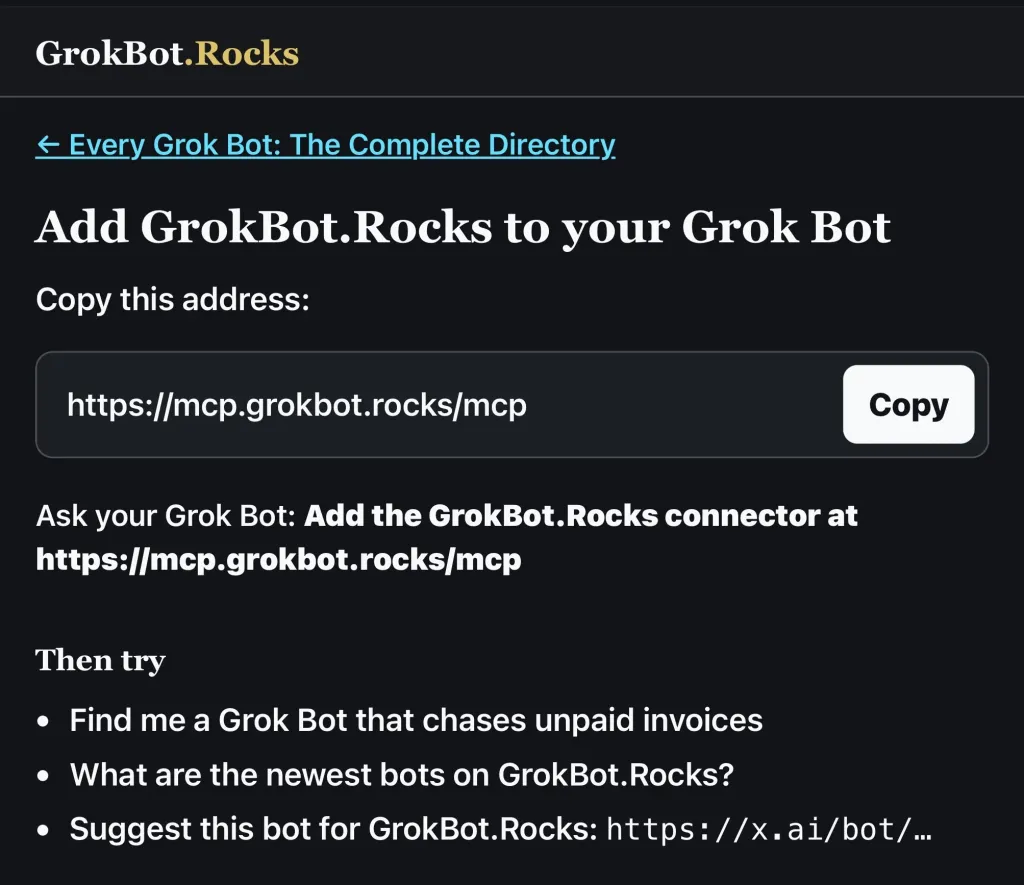
Here is the whole setup.
- Copy this address: https://mcp.grokbot.rocks/mcp
- In your Grok Bot, say: Add the GrokBot.Rocks connector at https://mcp.grokbot.rocks/mcp
That is it. No account. No key. It is free.
If you would rather do it by hand, open Grok Bot’s settings, add a custom connector, and paste the same address. The short how-to page, with a copy button, is here:
https://readmultiplex.com/wp-content/uploads/grokbot-rocks/connector/
You will also find a small link on the directory itself, labeled Add Rocks to your Grok Bot.
What to try
Then try talking to your bot the way you would talk to a good librarian.
- “Find me a Grok Bot that chases unpaid invoices.”
- “Find me a bot that files small-claims complaints.”
- “What are the newest bots on GrokBot.Rocks?”
- “Suggest this bot for GrokBot.Rocks:” and then a share link, like
https://x.ai/bot/…
Those are not imaginary examples. The first one is the kind of search the connector was built for: a job, in plain words. It comes back with real listings, best first, each with a short description, the creator’s name, the category, and a link to add it. The last one is how you help the shelf grow.
Here is what your bot can actually do with that library card:
- Find a Grok Bot for a job — search in plain words, best first, with a link to add each one.
- Look up one bot — one listing, from a share link, a GrokBot.Rocks page, or a bot id.
- Newest bots — the bots most recently added to the directory.
- Browse categories — the categories on Rocks, with how many bots each has.
- Suggest a bot for GrokBot.Rocks — it is reviewed before it appears, and is never listed automatically.
That last point matters. The connector is read-only, except for suggestions. A suggestion is not a listing. It goes into the same review queue we already use on the site. A person looks at it first. Nothing is added to the directory by itself.
The website is not going anywhere. You can still browse the whole shelf at GrokBot.Rocks, or just type grokbot.rocks. The connector is for the moments when you are already talking to your Grok Bot and you need a specialist — a bot that drafts a demand letter, a bot that follows up on late invoices, a bot that helps you sort a messy inbox — without leaving the conversation to go hunting.
Copy the address. Ask your bot to add it. Then ask it to find you something useful.
The shelf is open.
Add it: https://readmultiplex.com/wp-content/uploads/grokbot-rocks/connector/
The directory: https://readmultiplex.com/grokbot-rocks/
GrokBot.Rocks is an independent directory of public Grok Bots.
Behind the members line
Read Multiplex members get the working kit for this connector, right below:
- A paste-ready power prompt that finds three bots for a job, compares them, and helps you adapt the best one — without installing anything until you say so
- A staff-a-business walkthrough, run live on the connector, that fills real roles (booking, reviews, invoices) and shows how to avoid adding the wrong bot
- A weekly routine that uses “Newest bots” and keeps only what fits your field
- A field guide for reading a listing before you add it, including the red flags and the approval language to look for
- How to use the Rocks connector alongside your other connectors, without handing over more than the job needs
- How to suggest your own bot so it can actually be found
- The safety rules that keep this library card honest
The free article got you the card. The members section shows you how to put it to work.
Not a member yet? Become a Read Multiplex member and read the rest →
Already a free member? Upgrade to a paid membership to unlock this section →
Already a paid member? Log in below and keep reading.
Stay aware and stay curious,
🔐 Start: Exclusive Member-Only Content.
The rest of this article is for Multiplex members
You’ve reached the members-only part. Log in to keep reading right here, or join to unlock it.
- Full member-only articles: insights, wisdom and executive summaries
- The Multiplex members forum
- Member benefits and discounts
Already a member? You’ll come right back to this article after logging in. Forgot password?
Membership status:
🔐 End: Exclusive Member-Only Content.
~—~
~—~

~—~
Support ReadMultiplex at Multiplex.Tips

Support ReadMultiplex
Subscribe or donate by Bitcoin.
Copy address:bc1qkufy0r5nttm6urw9vnm08sxval0h0r3xlf4v4x

Send your receipt to [email protected] to confirm subscription.
Members
Become a member for full member-only articles, the Multiplex members forum, and member benefits and discounts.
 Past, present and future technology research + insights
Listen
🔊 Every article has a free “Listen to this ►” button. Hear it read aloud in your browser.
The Multiplex
- Advertise with us: Rates and booking
- X: @ReadMultiplex
- Buy a T-shirt: Multiplex.Love
- Program Guide: Multiplex.Today
- Podcast: Multiplex.Life
- Join the Multiplex team: Multiplex.Team
Stay updated
Get an email when we post new articles:
